
how Gate sentry

TEXT MESSAGES WORK

Last updated: November 1st, 2026

Gate Sentry, LLC ("Gate Sentry") makes access-control software for gated communities, commercial buildings, storage facilities and other properties (each a "Property"). When a Property uses Gate Sentry, we send text messages for that Property from (817) 383-8111. The program is called Gate Sentry Notifications. This page shows how phone numbers reach us and what people see when a number is entered.

What we send


• Visitor access codes and gate codes.
• Links to a digital visitor pass (SentryPass or Sentry Solo) or to open the gate from your phone (SoloPass).
• Links and codes to complete a Visitor Registration, or to check in at a commercial lobby.
• One-time sign-in codes and sign-in links for your Gate Sentry account.
• Lobby arrival alerts telling an employee that their visitor has arrived.

We do not send marketing or promotional messages. Links in our texts go to gatesentry.com addresses.

How a phone number reaches us

  1. You enter your own number. You type your own mobile number when you sign in to your Gate Sentry account by phone, fill out a Visitor Registration form, or check in at a lobby kiosk. We use that number only to send what you asked for, such as a sign-in code, a check-in code or the link for your visit.
  2. A resident enters a guest’s number. When a resident invites a guest in the Gate Sentry app or the resident web portal, they type the guest’s mobile number. The guest gets a text with an access code or a pass link for that visit.
  3. Property staff enter a number. Property administrators add residents, employees, guests and vendors in the Gate Sentry admin portal, and security staff can add a visitor’s number at check-in. Employees who get lobby arrival alerts by text receive a one-time introduction text from this number first. When a Property starts using Gate Sentry, it may also give us its resident list.

The Property is responsible for having permission to provide each number.

What people see when they enter a number

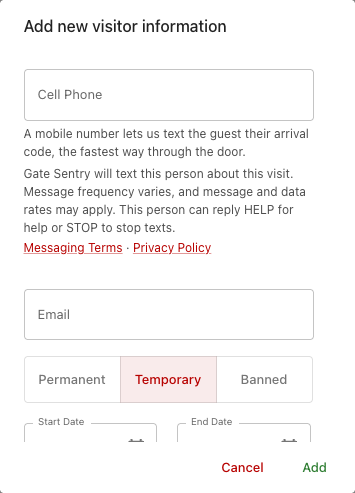
When a resident or property staff member adds a guest in our web portals, this notice appears under the phone number box:

“Gate Sentry will text your guest about this visit. Message frequency varies, and message and data rates may apply. Your guest can reply HELP for help or STOP to stop texts.”

It links to our Messaging Terms and Privacy Policy. (The admin portal says “this person” instead of “your guest”.)
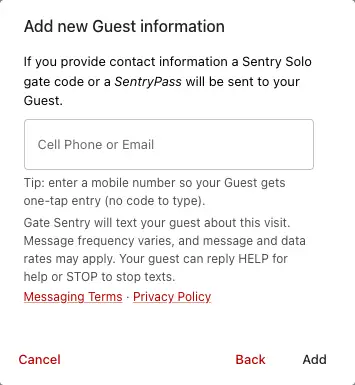
Resident web portal, Add Guest screen showing the text messaging notice under the phone number field
Resident web portal: Add Guest (click to enlarge)
Admin portal, Add Guest screen showing the text messaging notice under the phone number field
Admin portal: Add Guest (click to enlarge)

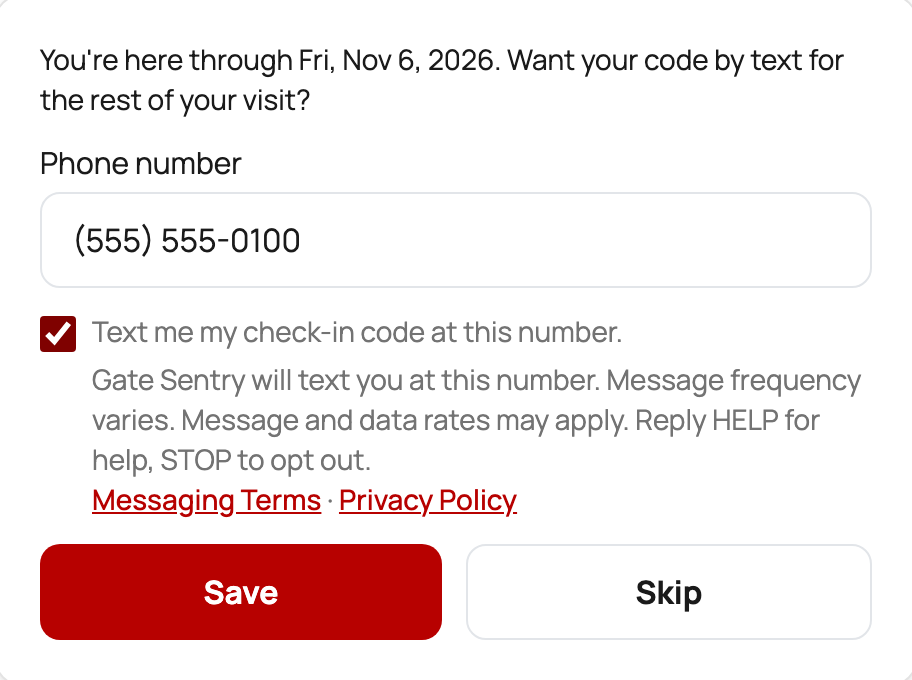
When people enter their own number on a Visitor Registration form or at a lobby check-in kiosk, the form says:

“Gate Sentry will text you at this number. Message frequency varies. Message and data rates may apply. Reply HELP for help, STOP to opt out.”

It has the same two links. On the shared lobby tablet, tapping one shows a QR code that opens the page on your own phone.
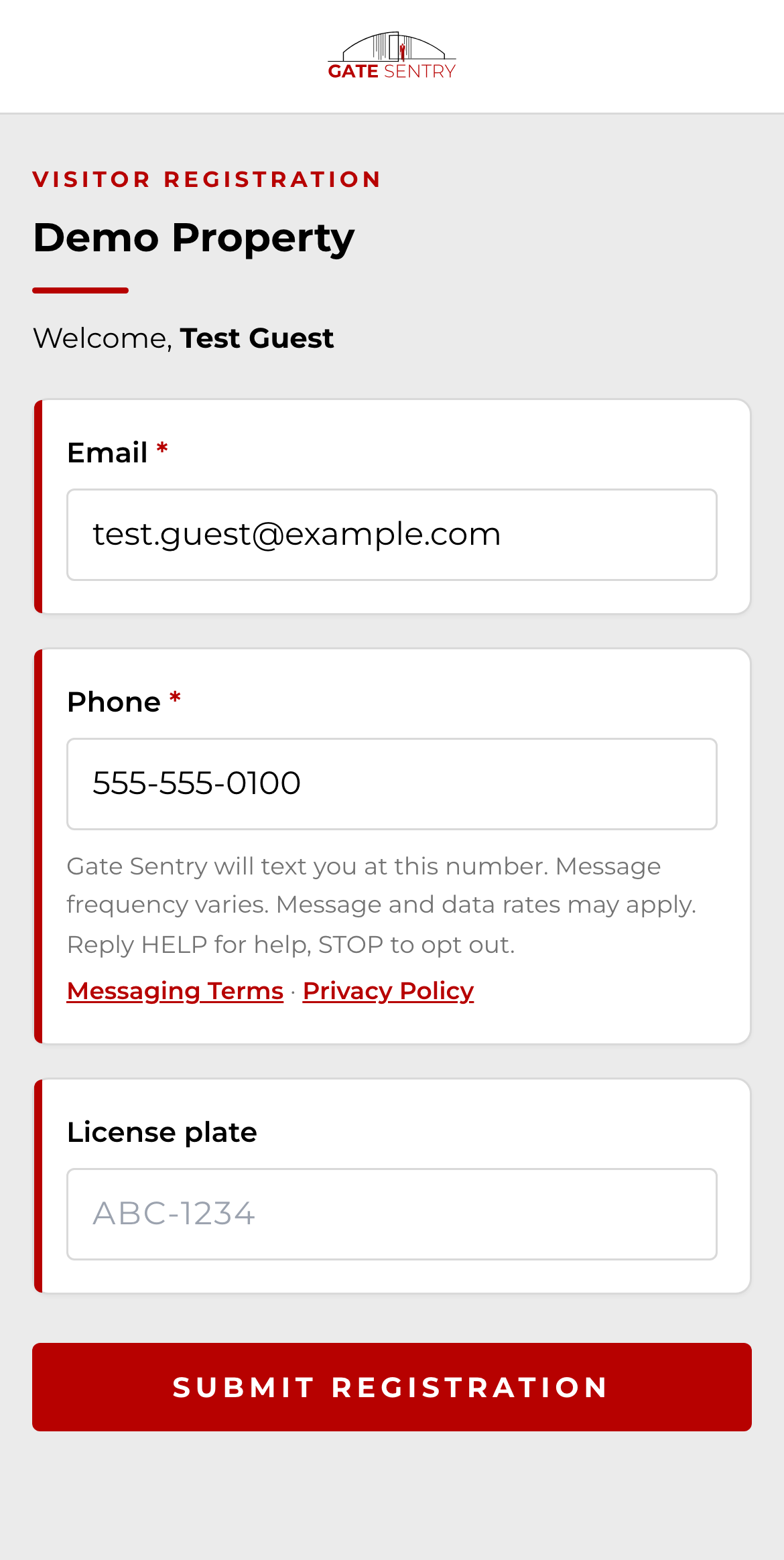
Visitor Registration form showing the text messaging notice
Visitor Registration form (click to enlarge)
Lobby check-in kiosk with the Text me my check-in code option and messaging notice
Lobby check-in kiosk: “Text me my check-in code” (click to enlarge)

What our texts look like

Our texts name Gate Sentry, usually by starting with “Gate Sentry:”. The first text we send to a number always includes “Reply HELP for help, STOP to opt out.” or the shorter “Reply STOP to opt out.” Later texts include it when there is room.

Your choices

Message frequency varies with your visit and account activity. Message and data rates may apply. Reply STOP to any message to opt out, or HELP for help. For help with a visit, contact the person or Property that invited you; for anything else, email support@gatesentry.com.

See our Messaging Terms and Privacy Policy.