
Video Intercom vs. QR Code Gate Software: 5-Year Cost
The conversation usually starts the same way at board meetings. Someone says, "We need to modernize the gate." Two proposals land on the table a few weeks later. Both promise to solve the same problems — outdated callboxes, no visitor tracking, frustrated residents — but the price tags are wildly different, and neither vendor is talking about what happens in years three, four, and five.
That's the real question HOA boards should be asking: not "which system has more features," but "what will this actually cost us over the next five years, and what are we really getting for the money?" Assuming you are going to be spending all this money, you would want it to last at least this long.
It's a question that matters more than most boards realize, because one of these approaches carries hidden costs that most vendors don't mention but capitalize on greatly: ongoing service contracts, component repairs, warranty extensions, cellular fees, firmware maintenance, fob replacement programs, support labor — and a full hardware replacement cycle every 3 to 5 years at up to $10,000 per gate. Individually, each cost looks manageable. Stacked together over five years, they can exceed the original installation price several times over.
This article breaks down the two modern paths forward — hardware-heavy video intercom replacement and software-first QR code retrofit — with real numbers, honest tradeoffs, and the hidden costs that rarely make it into the sales deck. Along the way, we'll look at how software-based solutions like VirtualKeypad eliminate entire categories of cost by replacing physical hardware at the gate with a phone browser and a QR code sign.
The Two Modern Paths Forward
Before comparing costs, it's worth defining exactly what each approach involves, because the differences are bigger than they sound.
Path A: Video Intercom Replacement
This approach replaces every callbox on the property with a new cloud-connected video intercom unit or kiosk. The hardware is proprietary, mounted at each gate, and requires its own power, networking, and often its own cellular data plan. Residents download an app to answer video calls from visitors, and the intercom screen becomes the primary interaction point at the gate.
Deployment usually involves trenching, conduit work, mounting, and cellular provisioning. Typical timeline: 6 to 12 weeks depending on complexity.
Path B: QR Code Retrofit Gate Software
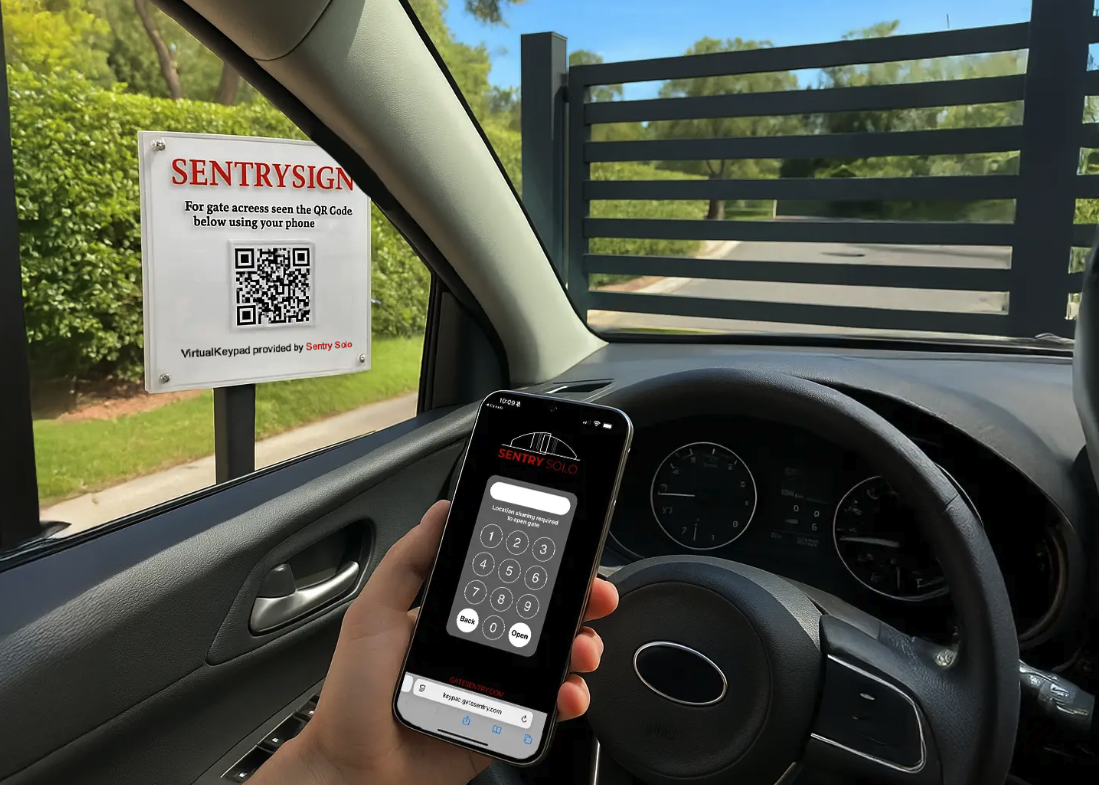
This approach keeps your existing gate operators and barrier hardware in place and adds a software layer on top. Residents use a mobile app to manage their guests. Visitors receive a digital pass that can be easily added to their mobile wallet — no app download required. Upon arrival, guests scan the QR code posted on a sign at the gate. This opens VirtualKeypad in their phone's browser, they enter their code, and the gate opens instantly.
VirtualKeypad is what makes hardware-free gate access actually work. There's no physical keypad to install, maintain, or replace. The keypad appears on the visitor's phone browser the moment they scan the QR code, they enter their unique time-limited access code, and the gate opens. No app download, no callbox hardware, no wiring, no weatherproofing — just a sign with a QR code and software doing the work of a costly video intercom.
No gate hardware replacement. No trenching. Typical deployment: days to a few weeks, with most communities live and trained within two weeks.
Both approaches are "modern" and "cloud-based." That's where the similarities end.
The 5-Year TCO Breakdown
Here's where the reality of each approach becomes clear. The following figures reflect typical pricing for a mid-sized HOA — roughly 300 units with one main staffed gate and two secondary unmanned entry points.
Upfront Hardware Costs
Video intercom replacement:
Typical cost per video intercom unit runs $2,000 to $5,000 depending on model, features, and whether video is included. For a community with three entry points, that's $6,000 to $15,000 in hardware alone — before installation.
Retrofit gate software:
Minimal to none. With solutions like Sentry Solo, entry points require no hardware installation at all — just a QR code sign. For most communities, the entire hardware investment is virtually zero compared to the cost of one video intercom.
The difference here is architectural, not incremental. One approach requires hardware at every gate. The other requires essentially none.
Installation and Infrastructure
Video intercom replacement:
Installation is where the sticker shock usually happens. Trenching for power and data, conduit runs, cellular modem provisioning, mounting brackets, weatherproofing, and electrical work add up fast. Industry-typical installation costs run $1,500 to $4,000 per gate, with some communities paying more when the existing infrastructure requires significant upgrades.
Total installation for a three-gate community: $4,500 to $12,000.
Retrofit gate software:
A small fraction of hardware-heavy installation costs — typically a modest one-time setup fee that covers configuration, training, and onboarding. No trenching, no conduit, no electrical work, no gate downtime. Because there's no physical hardware being installed at the gates, deployment is primarily about software configuration, staff training, and resident onboarding.
Monthly Software and Subscription Fees
Video intercom replacement:
Video intercom platforms typically charge $25 to $60 per unit per month, sometimes with additional per-resident or per-door fees. For a 300-unit community with three intercoms, monthly subscription costs can reach $125 to $300 per month, plus per-resident fees depending on the vendor.
Five-year subscription cost: $7,500 to $18,000.
Retrofit gate software:
Software-only platforms typically price per community rather than per-unit of hardware, which becomes significant as your gate count grows. Pricing is structured so the monthly cost stays predictable as the community scales, and in most cases runs a fraction of what communities pay for per-unit video intercom subscriptions — without the per-door, per-resident, or per-feature fees that inflate hardware-heavy pricing over time.
Maintenance, Repairs, and the Hardware Replacement Cycle Nobody Talks About
This is the cost category that rarely appears in initial proposals — and where the long-term math really separates the two approaches. Hardware-heavy systems don't just cost money upfront. They cost money constantly, in ways that compound over five years into numbers most boards never see coming.
Video intercom replacement: the full maintenance picture
When you install a video intercom system, you're not just buying hardware — you're signing up for an ongoing operational burden that includes repairs, service contracts, replacement parts, connectivity upgrades, and eventually, full hardware replacement. Here's what that actually looks like in practice.
Routine Service Calls
Outdoor video intercoms require regular service visits — cleaning camera lenses, recalibrating touch screens, updating firmware manually, resealing weatherproofing, and diagnosing intermittent issues. Most vendors either require a service contract or charge per visit.
- Service contract (recommended by most vendors): $500 to $1,500 per year per gate
- Per-visit service calls (no contract): $150 to $300 per visit, with 2–4 visits per gate per year typical
- Emergency/after-hours calls: $250 to $500 per incident
For a three-gate community, routine service alone runs $1,500 to $4,500 per year — between $7,500 and $22,500 over five years, before any major repairs or replacements.
Component Repairs and Replacement Parts
Individual components fail before the full unit needs replacement. The typical repair list for a video intercom in years 2 through 5:
- Camera module replacement: $200 to $500 per incident (fogging, lens scratches, image sensor failure)
- Touch screen replacement: $300 to $800 per incident (cracking, responsiveness failure, UV damage)
- Speaker and microphone replacement: $100 to $300 per incident (weather damage, volume degradation)
- Cellular modem replacement: $200 to $500 per incident (carrier updates, hardware failure)
- Power supply and wiring repairs: $200 to $600 per incident
- Weatherproofing reseals: $100 to $250 per service
- Mounting bracket and enclosure repair: $150 to $400 per incident
Industry data suggests a typical gate experiences occasional component failures after the first year of service. That's $400 to $1,000 in component repair costs per gate, per year.
Warranty and Extended Service Contracts
Most video intercom hardware carries a 1-year manufacturer warranty. After that, communities have three bad options:
- Pay for repairs out of pocket — exposes the HOA to unpredictable budget variance
- Extended warranty — typically 10% to 15% of original hardware cost per year ($200 to $750 per unit annually)
- Full service contract with vendor — often bundled with mandatory software subscriptions
Over five years, warranty and service contract costs alone can reach $4,500 to $12,000 per gate — and that's before any actual repairs happen.
Cellular and Connectivity Fees
Every video intercom needs network connectivity. For outdoor gate locations, this is almost always cellular, which comes with its own ongoing cost structure:
- Cellular data service: $15 to $40 per month per intercom
- Carrier upgrade fees: $200 to $500 per unit when cellular standards change (3G sunset was $300–$600 per unit for most communities)
- Network redundancy/failover: $10 to $25 per month per unit for backup connectivity
Five-year connectivity costs for a three-gate community: $2,700 to $7,200.
Software Update Management
Unlike true cloud-native platforms, most video intercom hardware requires firmware updates pushed to each individual unit. These updates:
- Often require on-site technician visits ($150 to $300 per unit per update)
- Occasionally brick units that were working fine before the update
- Create compatibility issues with older hardware, accelerating replacement cycles
- Are sometimes gated behind service contracts, meaning communities without active contracts fall behind on security patches
Communities without service contracts face $150 to $400 per gate per year in firmware maintenance costs.
Credential and Fob Management
Even with video intercom systems, most communities still distribute RFID fobs or mobile credentials to residents. Ongoing costs include:
- Fob replacement (lost/stolen): $15 to $45 per fob, with 8–15% annual replacement rate
- New resident onboarding: $20 to $60 per credential issued
- Fob reader maintenance: $150 to $400 per year per reader
- Mobile credential licensing: $1 to $5 per resident per month with some platforms
For a 300-unit community, credential management alone can add $1,000 to $2,400 per year.
Resident and Staff Support
Video intercom systems generate ongoing support demand that often falls on property management:
- Residents needing help with the app
- Guests unable to reach residents through the callbox
- Guards requesting support for the system integration
- Board members pulling reports and audit data
Industry estimates put this at $1,000 to $2,400 per year in property management labor for a 300-unit community — rarely itemized, but very real.
The 3-to-5-Year Full Replacement Cycle
Here's the part that almost never comes up in the sales demo: even with all the above maintenance investment, video intercom hardware typically needs to be fully replaced every 3 to 5 years, at a cost of up to $7,000 per entry point.
This isn't a worst-case scenario or a failure mode. It's the standard lifecycle of hardware-heavy gate systems, and it happens for two compounding reasons:
1. The hardware itself degrades beyond the point of cost-effective repair.
By year three, the cumulative effect of weather exposure, temperature swings, UV damage, vandalism, moisture infiltration, and constant cellular data usage means most units are showing meaningful wear. Screens crack. Cameras fog. Speakers blow out. Cellular modems become outdated. Weatherproofing seals fail. Repair costs exceed replacement costs.
2. Vendors push forced upgrades.
Even when hardware is still technically working, manufacturers regularly discontinue support for older models. Firmware updates stop. Replacement parts become unavailable. Cellular standards shift (the 3G sunset is a recent example that stranded thousands of video intercoms overnight). New "must-have" features — updated camera resolutions, new mobile OS compatibility, enhanced security protocols — are available only on the newer generation of hardware. Communities that want to keep receiving updates, security patches, or technical support are effectively required to upgrade.
The result is a hardware replacement cycle baked into the business model. What looks like a one-time capital expense at install is actually a recurring capital expense every 3 to 5 years. For a three-gate community, that's up to $21,000 in hardware replacement costs alone, on top of all the ongoing maintenance above, plus another round of installation labor, community disruption, and resident retraining.
Most HOA boards don't find out about this cycle until year three or four, when the first replacement quote lands. By that point, the sunk cost of the original installation makes walking away feel impossible — so the community pays, and the cycle continues.
Total Realistic Maintenance Picture
Adding it all up, the real five-year maintenance burden for a three-gate video intercom deployment:
| Maintenance Category | 5-Year Cost (3 gates) |
|---|---|
| Service contracts / routine service | $7,500 – $22,500 |
| Component repairs and replacement parts | $6,000 – $15,000 |
| Warranty extensions | $4,500 – $12,000 |
| Cellular and connectivity | $2,700 – $7,200 |
| Firmware and software update management | $2,250 – $6,000 |
| Credential and fob management | $5,000 – $12,000 |
| Resident and staff support labor | $5,000 – $12,000 |
| Full hardware replacement (year 3–5) | $9,000 – $21,000 |
| Reinstallation labor for replacement | $4,500 – $10,000 |
| Total 5-Year Maintenance Burden | $46,450 – $117,700 |
That's not a typo. Once the full picture of maintenance, repairs, connectivity, support, and the replacement cycle is included, a hardware-heavy gate deployment can cost more in ongoing maintenance than its original installation price — often several times over.
Retrofit gate software:
A small fraction of hardware-heavy maintenance costs — primarily standard software subscription fees, with software updates, feature releases, and technical support included in the standard subscription.
The contrast is architectural, not incremental:
- No outdoor electronics to weather or vandalize — no service calls, no component replacements, no weatherproofing
- Software updates deploy automatically to every device, every community, at the same time — no per-unit firmware visits, no service contracts required to receive updates
- No forced hardware obsolescence cycle — the platform isn't tied to the hardware, so evolution happens through software, not capital expense
- No cellular plans per unit — connectivity is handled through the visitor's own smartphone, not proprietary hardware modems
- No fob program to maintain — digital credentials replace physical ones, eliminating the ongoing fob replacement treadmill
- Primary physical expense is simply replacing a QR code sign if it becomes damaged or weathered over the years
When the industry releases a new feature, it's pushed as a software update. When cellular standards change, it's a software configuration, not a hardware refresh. There is no major gate installation or hardware failure aftermath to deal with.
Hidden Costs Nobody Mentions in Sales Demos
Here's what usually gets left out of the first proposal:
Video intercom hidden costs:
- Cellular data service for each unit ($15–$40 per month per intercom)
- Extended warranty and service contracts (typically 10–15% of hardware cost annually)
- Per-resident credential fees or mobile app licensing
- Fob replacement programs when residents lose credentials
- Professional resident onboarding and app support
- Per-call or per-feature pricing on some platforms
Retrofit gate software hidden costs:
The value of retrofit software is transparency. A well-structured subscription bundles training, software updates, technical support, and the core platform into a single predictable cost — without the per-resident fees, warranty extensions, cellular surcharges, or replacement cycles that hardware-heavy systems accumulate year over year. The price you see in year one is the price that holds in year five.
The value of transparency compounds over five years. If the initial quote doesn't match the renewal quote, boards end up with budget surprises that damage trust with homeowners.
The 5-Year Total Cost Comparison
Here's what the full five-year picture typically looks like for a 300-unit HOA with three gates — including the comprehensive maintenance burden and hardware replacement cycle most vendors don't discuss upfront:
| Cost Category | Video Intercom Replacement | QR Code Retrofit Software |
|---|---|---|
| Upfront hardware | $6,000 – $15,000 | Minimal (QR signs only) |
| Installation & infrastructure | $4,500 – $12,000 | Modest one-time setup fee |
| 5-year subscription fees | $7,500 – $18,000 | A fraction of per-unit pricing |
| Service contracts & routine service | $7,500 – $22,500 | Included |
| Component repairs & replacement parts | $6,000 – $15,000 | Minimal |
| Warranty extensions | $4,500 – $12,000 | Included |
| Cellular & connectivity fees | $2,700 – $7,200 | Included |
| Firmware & update management | $2,250 – $6,000 | Included |
| Credential & fob program | $5,000 – $12,000 | Eliminated (digital credentials) |
| Resident & staff support labor | $5,000 – $12,000 | Minimal |
| Full hardware replacement (year 3–5) | $9,000 – $21,000 | N/A |
| Reinstallation labor for replacement | $4,500 – $10,000 | N/A |
| 5-Year Total | $64,450 – $162,700 | A fraction of the total |
The numbers that shock most boards are the maintenance and replacement lines. A hardware-heavy deployment isn't a one-time capital investment — it's a recurring capital investment, with the meter resetting every three to five years, layered on top of ongoing service contracts, repairs, connectivity fees, and support labor that never stop.
Retrofit gate software, by comparison, typically costs a fraction of the five-year total — with no replacement cycle, no per-gate hardware multiplier, and no maintenance categories that compound over time.
The takeaway isn't that one approach is always cheaper. It's that software-first retrofit deployments remove entire cost categories that hardware-heavy deployments carry for the full lifecycle of the system — and then reset and carry again.
Beyond Cost — What Each Approach Actually Delivers
Cost matters, but so does what you're getting. Here's an honest look at the experience each path delivers.
Resident and Guest Experience
Video intercom replacement:
Residents download an app and answer video calls from guests at the gate. The guest interacts with a screen at the callbox. The experience is modern, but it requires every visitor to interact with outdoor hardware, and every resident to be available to answer a video call at the moment a guest arrives. If the resident doesn't answer, the guest waits at the gate — often in traffic or in bad weather.
QR Code Retrofit with VirtualKeypad:
Residents manage their guests in advance through the app. Guests receive a digital pass that can be saved directly to their mobile wallet, allowing them to arrive without needing to download any new apps. At the gate, they simply scan the QR code posted on a sign — VirtualKeypad opens instantly in their phone's browser, they enter their access code, and the gate opens. No app download, no video call, no waiting for someone to answer.
The experience is asynchronous, which is usually how residents actually want it. Residents get a notification when their guest arrives rather than a live video call demand. Guests get a frictionless entry that works the same way at every gate, every time — with no hardware to break, no screen to freeze, no speaker to fail.
For delivery drivers, contractors, rideshares, and one-time visitors, this is the difference between a 3-second entry and a multi-minute back-and-forth at a broken callbox.
Property Management and Staff Experience
Video intercom replacement:
Staff or property managers are often tasked with constantly updating directories, fielding calls from confused visitors at the gate, and managing ongoing hardware troubleshooting. The video intercom itself is oriented toward unmanned gates, but still requires significant administrative overhead.
Retrofit gate software:
Sentry Solo completely automates the visitor check-in process. Entry logging happens in seconds without any manual intervention. Reports and audit trails are generated automatically in the cloud dashboard, freeing up staff and property managers from gate-related administrative burdens.
Deployment Disruption
Video intercom replacement:
Trenching, conduit, and mounting work takes weeks. Gates may need to operate in bypass mode during construction. Residents experience disruption, and the community often fields complaints during the install window.
Retrofit gate software:
No construction. Gates remain fully operational throughout deployment. Training happens in parallel with configuration. Most communities are fully live within days to a couple of weeks, not months.
When Video Intercom Replacement Makes Sense
To be fair to the video intercom approach, there are scenarios where it genuinely fits:
- New construction where trenching is already happening and hardware costs are absorbed in the build budget
- Communities that specifically want live video interaction at every gate, for every visitor
- Properties with unlimited capital budgets and a preference for visible hardware presence over software flexibility
- Single-gate properties where per-gate hardware cost doesn't multiply
If your community matches one of those profiles, the TCO gap narrows considerably.
When QR Code Retrofit Software Makes Sense
Retrofit software is the stronger fit for most existing HOAs, especially when:
- Gate operators are functional and don't need replacement
- The board wants fast deployment with minimal community disruption
- Capital budgets are tight and homeowner reserves are a concern
- The property has multiple gates where per-gate hardware cost compounds
- The community has unmanned main gates, secondary gates, pedestrian entries, or amenity access points where installing video intercoms would be prohibitively expensive
- Guests need a simple, app-free way to enter — especially deliveries, contractors, and short-term visitors
- The community wants to pilot modernization before committing to a full rollout
VirtualKeypad is particularly valuable for properties with multiple entry points. A single-gate community might justify a video intercom. A community with a main gate, a secondary gate, a pool entry, a gym entry, and a rear pedestrian gate cannot — the hardware cost multiplies by five, and so does the replacement cycle. With VirtualKeypad, every additional entry point costs a small fraction of a traditional callbox install because it's just a sign and software.
The core question is usually: "Do we want to replace hardware that still works, or do we want to add software that makes everything we already have work better — at every gate, not just the main one?"
How to Evaluate Proposals Side by Side
When the two vendor proposals land on your board's desk, here's a checklist to cut through the marketing:
- Ask for a full 5-year cost projection, in writing. Include subscription, maintenance, replacement, and any per-unit or per-resident fees.
- Request a line-item breakdown of what's included vs. what's an add-on. Cellular service, warranty extensions, and app support fees hide here.
- Confirm the deployment timeline and what happens if it slips. Who absorbs the cost of delays?
- Ask what happens in year 6. Is there a hardware refresh obligation? A subscription rate lock?
- Require references from communities similar to yours — same size, same gate configuration, same staffing model.
- Ask about exit clauses. If you want to switch providers in three years, what happens to your data, your hardware, and your contract?
- Get the resident experience demonstrated in person, not just in a sales video.
Red flags to watch for:
- Vague language around "maintenance included" without specifics
- Per-resident fees that scale with community growth
- Required hardware refresh cycles written into multi-year contracts
- No clear answer on cellular data fees
Frequently Asked Questions
Can we keep our existing gate operators and still modernize?
Yes. Most modern retrofit platforms work with existing gate operators by connecting to the same relays that your current fobs, clickers, or callboxes use. You're adding a software layer, not replacing mechanical hardware.
How long does retrofit deployment actually take?
Most retrofit software deployments run from configuration to full go-live in days to a couple of weeks, depending on how many gates and how much training is needed. Compare that to the 6-to-12-week timeline typical for video intercom replacement, which involves trenching, conduit, mounting, cellular provisioning, and gate downtime during construction.
What's the real lifespan of video intercom hardware?
Video intercom hardware typically needs to be fully replaced every 3 to 5 years, at a cost of up to $7,000 per entry point. This happens for two reasons working together: outdoor electronics physically degrade from weather, UV exposure, and constant use, and manufacturers regularly discontinue support for older hardware — forcing communities to upgrade if they want to keep receiving firmware updates, security patches, or technical support. Manufacturer specs often claim 7–10 year lifespans, but real-world replacement cycles are consistently shorter, and the 3G cellular sunset is a recent example of how an external change can strand otherwise-functional hardware overnight.
What's the annual maintenance cost of a video intercom system?
Realistic annual maintenance costs for a three-gate video intercom deployment range from $9,000 to $23,000 per year, not including the full hardware replacement cycle. This includes service contracts ($1,500–$4,500/yr), component repairs ($1,200–$3,000/yr), warranty extensions ($900–$2,400/yr), cellular fees ($540–$1,440/yr per gate), firmware management ($450–$1,200/yr), fob and credential programs ($1,000–$2,400/yr), and property management support labor ($1,000–$2,400/yr). Most initial vendor proposals don't itemize these costs, which is why boards are often surprised by the total maintenance burden in year two.
How often do video intercoms actually need repairs?
Industry data suggests outdoor video intercom units experience occasional component failures after the first year of service. Common failure points include camera modules, touch screens, speakers, microphones, cellular modems, and weatherproofing seals. Individual repairs range from $100 to $800 each, with emergency or after-hours service calls costing $250 to $500 per incident on top of the repair itself.
Will residents need to download a new app?
With video intercom replacement, yes — residents need the vendor's app to answer calls and manage access. With QR code retrofit software, residents use a resident app to manage their guests, but visitors do not need to download anything. Guests receive a pass that can be added right to their mobile wallet. When a guest arrives at an unmanned gate, they scan the QR code sign, VirtualKeypad opens in their phone's browser, they enter their access code, and the gate opens. This is a meaningful experience difference for communities with high guest volume, delivery traffic, or contractor access.
What is VirtualKeypad and how does it work?
VirtualKeypad is a browser-based keypad that replaces the physical keypad, callbox, or intercom traditionally mounted at a gate. Instead of installing hardware, communities post a small sign with a QR code at each unmanned entry point. When a visitor scans the QR code, VirtualKeypad opens instantly in their phone's browser — no app download required. The visitor enters their unique, time-limited access code (provided in their digital guest pass) and the gate opens. Every entry is logged with the visitor's name, access method, and timestamp. Because there's no outdoor hardware, there's nothing to weather-damage, vandalize, or replace — making VirtualKeypad especially valuable for secondary gates, amenity entries, and pedestrian access points where installing a video intercom would be prohibitively expensive.
What happens if we switch providers in three years?
With hardware-heavy platforms, switching means either replacing the hardware again or leaving it installed and unused. With software platforms, the transition is primarily a data migration and retraining effort — no stranded hardware investment.
Is there a way to pilot either approach before committing?
Video intercom replacement is difficult to pilot because the hardware cost is front-loaded. Retrofit gate software is easier to pilot — many communities start with one gate or one entry point before rolling out to the full property.
The Bottom Line
Modernizing gate access doesn't have to mean replacing everything you already have — and it definitely doesn't have to mean committing to replacing it again in three to five years.
For most established HOAs, the math favors a software-first approach: lower upfront capital, faster deployment, no forced hardware replacement cycle, and the flexibility to evolve as technology changes without ripping out infrastructure every few years. Solutions like VirtualKeypad make this possible by replacing the physical keypad, callbox, or intercom with a simple QR code sign and software that runs in the visitor's phone browser — eliminating the single biggest driver of long-term gate access costs.
The five-year numbers tell a consistent story. Hardware-heavy systems front-load cost, carry it forward through maintenance, and then reset the entire capital expense when the replacement cycle comes due — often with the same community disruption, the same reinstallation labor, and the same "modernization" conversation all over again. Software-first systems spread cost evenly, eliminate the replacement cycle entirely, and continue improving through updates pushed to hardware you already own.
If your community is in the "we need to modernize the gate" conversation right now, the question to bring to the next board meeting isn't which vendor has better features. It's which approach will still be the right answer in year five — when the reserve study is due, the homeowners are asking about the next assessment, and someone on the board is about to hear the words: "It's time to replace the hardware again."
Ready to see what retrofit gate software looks like for your community?
Schedule a demo or download our free cost comparison worksheet to evaluate your options.
Schedule a demo