
Sentry Solo for Gated Communities

Mobile Access Control for Unmanned Gated Communities

Sentry Solo opens gates, doors, and amenities from a phone. Residents tap to open with VirtualKey, guests tap SoloPass, and vendors scan the SentrySign QR code to enter a code. It eliminates hardware like callboxes, keypads, and fobs, and visitors don't need an app.

The Real Cost of Hardware

Every Piece of Gate Hardware Is Something That Breaks

Fobs, keypads, callboxes, and kiosks all share the same problem: they wear out, get lost, and cost money to fix. Sentry Solo eliminates hardware like fobs, keypads, callboxes, and kiosks, giving everyone access from their phone instead.

Fobs & Remotes

Lost, cloned, and constantly re-issued

Keypads

Shared codes nobody ever changes

Callboxes

Weather failures and service calls

Kiosks

Go down and strand visitors at the gate

The Hardware Way

  • Fobs and remotes get lost, cloned, and re-issued for a fee
  • Keypad codes get shared around and almost never change
  • Callboxes and kiosks fail in the weather and need service visits
  • Every move-out can mean replacing, disabling, or collecting physical credentials

The Sentry Solo Way

  • VirtualKey gives residents mobile access instead of fobs and remotes
  • SoloPass gives invited guests permanent, temporary, or one-time access from their phone, with no app
  • VirtualKeypad gives vendors and service providers unique, time-limited codes
  • Intercom lets unexpected visitors call a home by address, with names and numbers kept private
Cloud-Based Access Management

Mobile Access for Every Type of Arrival

Sentry Solo gives residents everyday mobile entry, guests tap-to-open SoloPass access, vendors controlled VirtualKeypad access, unexpected visitors a built-in Intercom, and property teams one place to manage it all. It eliminates hardware like callboxes, keypads, and fob readers.

Resident Access

Everyday Entry with VirtualKey

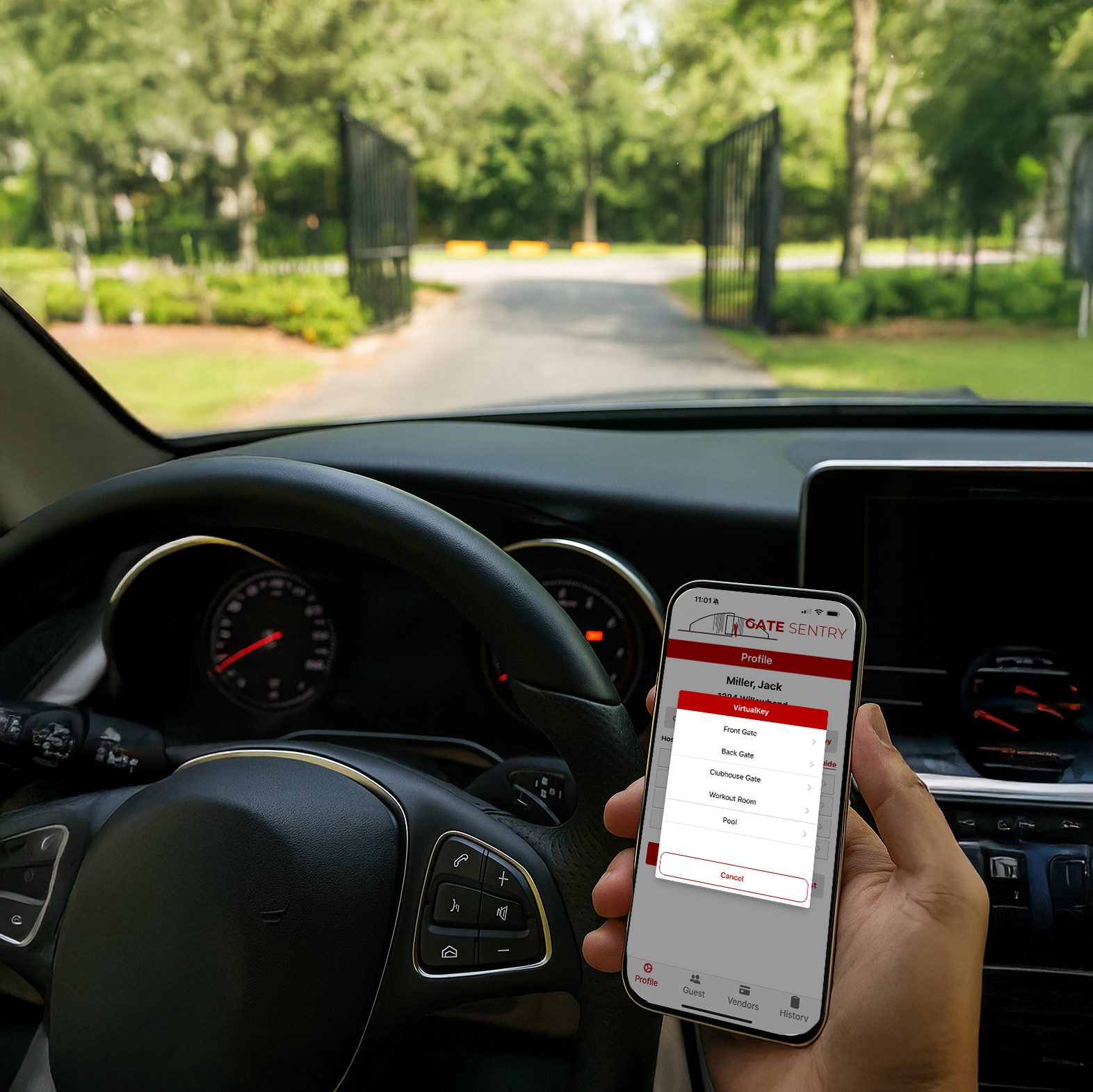
Residents use VirtualKey in the Gate Sentry app for everyday access to gates, doors, and community amenities.

  • Mobile entry: Tap to open approved gates, doors, and amenities, near the entrance or from anywhere, depending on community settings.
  • No physical credential: Reduce reliance on fobs, cards, remotes, and shared resident gate codes.
  • Guest and vendor management: Send SoloPasses and VirtualKeypad codes from the app.
  • Arrival alerts: Get a push notification and email when your visitors arrive.
  • Hands-free option: Communities can add Sentry Beacon, which opens supported entrances as an authorized resident approaches.
Watch Software Videos
Sentry Solo VirtualKey mobile access for residents
Guest using SoloPass tap-to-open mobile access

Invited Guest Access

Tap-to-Open Guest Access with SoloPass

SoloPass is a secure guest pass for Sentry Solo. At the entrance, guests open it on their phone and tap to open the gate.

  • Send the invitation: Residents send guests a SoloPass link by text or email.
  • Nothing to download: No app, account, or access code required.
  • Tied to the guest's phone: Forwarding the link doesn't give anyone else access.
  • Flexible access: Residents choose one-time, temporary, or permanent access for each guest.

Vendor & Service Access

Controlled Entry with VirtualKeypad

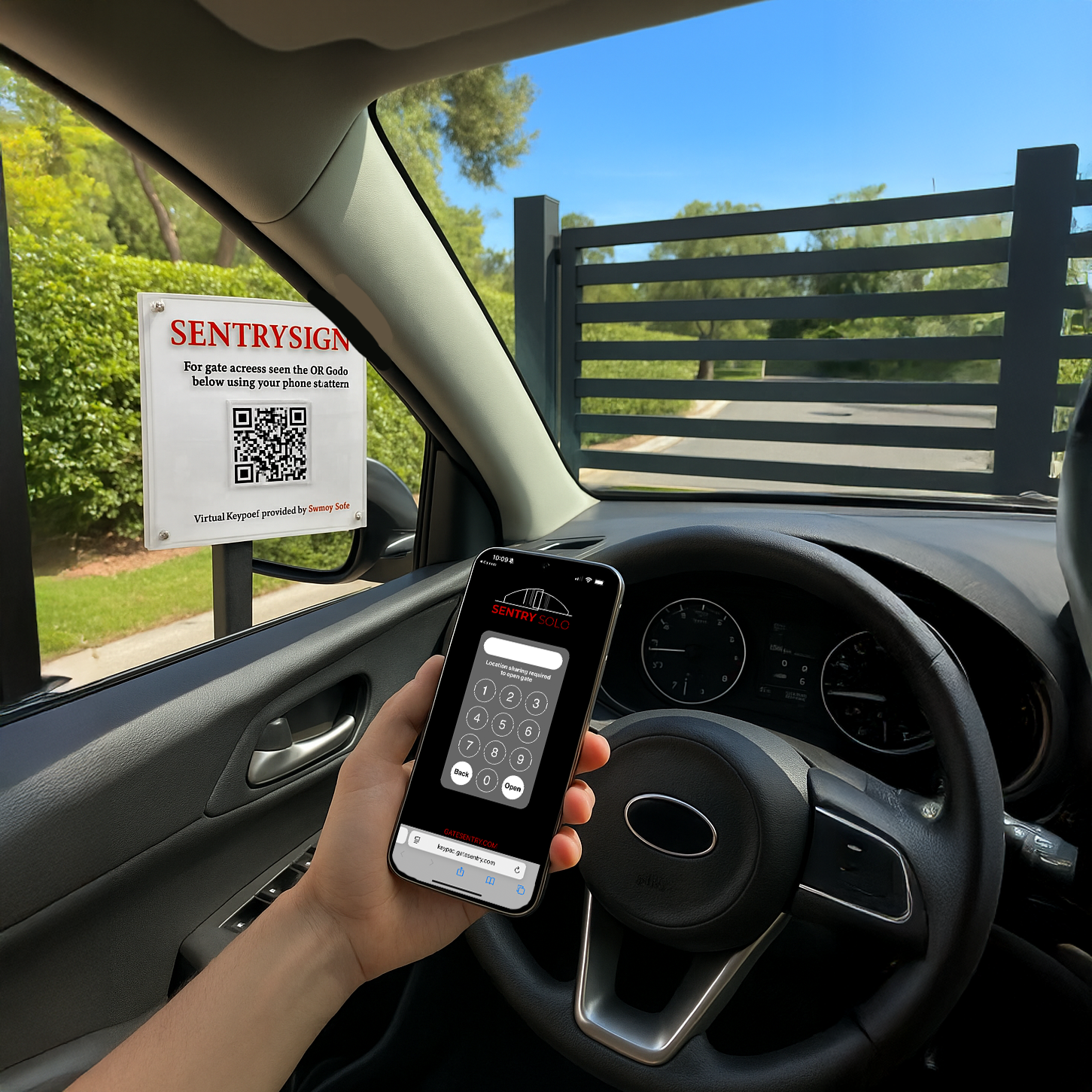
Vendors and service providers enter access codes through the mobile VirtualKeypad instead of a traditional physical keypad.

  • Unique codes: Each vendor gets their own system-generated code by text or email, so no one shares a property-wide gate code.
  • Time-limited: Codes expire after the duration the resident sets.
  • Scan the SentrySign: The QR code at the entrance opens the VirtualKeypad in the vendor's mobile browser.
  • No app required: Vendors complete entry from their phone without downloading an app.

Unexpected visitor? Anyone without a SoloPass or code can use the Intercom built into the VirtualKeypad to call a home by address. Names and phone numbers stay private, and if your community allows it, the resident can open the gate remotely.

Watch Software Videos
Vendor accessing the Sentry Solo VirtualKeypad from a phone
Administrator managing Sentry Solo through the web portal

Admin Portal

Manage Access from One Dashboard

Property teams manage residents, guest and vendor access, visitor activity, and entry records from one cloud-based dashboard.

  • Resident management: Add or remove resident access as households move in or out.
  • Access scheduling: Set weekly hours for each entrance by group, with custom groups, holiday closures, and hold-open.
  • Account restrictions: Block selected entrances for restricted households, and give selected accounts unrestricted access.
  • Ban list: Banned visitors' SoloPass and VirtualKeypad codes are blocked.
  • Digital entry logs: Review access activity from one central location.
  • Community communication: Send property-wide messages by app push notification and email.
What You Leave Behind

Why Gated Communities Are Switching to Mobile Access

Fully mobile access that eliminates hardware like callboxes, keypads, and fob readers. Sentry Solo simplifies access control for HOAs and strengthens security without the cost or complexity of legacy systems.

No Fobs to Lose or Replace

The resident's phone is the key. Nothing to hand out, clone, deactivate, or re-issue when it goes missing.

Works with Your Existing Gates

No new wiring, trenching, or callbox to install. Most communities go live in 30 days or less.

No Waiting at the Gate

Residents send guests a SoloPass ahead of time and get arrival alerts by push and email, so nobody waits on a callbox or a phone call.

No App for Visitors

Guests tap SoloPass, and vendors scan the SentrySign to enter their code. No download, no shared keypad code, no callbox to figure out.

No Re-Keying on Move-Out

Remove a resident's access from the admin portal in seconds. No collecting fobs, no changing locks, no shared codes left active.

No Blind Spots

Every entry is logged and searchable, giving you the audit trail paper logs and keypads never could.

Watch Sentry Solo in Action

See exactly how residents, guests, vendors, and HOA administrators use Sentry Solo at an unmanned community gate, through real-world demonstration videos.

Watch Software Videos
FAQ

Unmanned Gate Access FAQs

Do residents still need a fob, remote, or gate clicker?
No. With Sentry Solo, the resident's smartphone is the key. They open the gate with a tap using VirtualKey in the Gate Sentry app, near the entrance or from anywhere, depending on community settings. There are no fobs or remotes to buy, hand out, lose, clone, or replace.
Do visitors have to download an app to get in?
No. Guests receive a SoloPass by text or email, open it on their phone, and tap to open the gate, with no app, account, or code. Vendors receive a unique access code and scan the SentrySign QR code at the gate, which opens the VirtualKeypad in their phone's browser. Neither needs an app, and no one shares a keypad code.
How do guests get into a gated community without a gate code?
Residents send guests a SoloPass by text or email. The guest opens it on their phone and taps to open the gate, with no app, account, or code. SoloPass can be one-time, temporary, or permanent, and it's tied to the guest's phone, so forwarding the link doesn't give anyone else access.
What if a visitor arrives without a SoloPass or code?
They can use the Intercom built into the VirtualKeypad. The visitor searches by address and places a secure call to the household, and resident names and phone numbers are never shown. If your community allows it, the resident can open the gate remotely during the call.
How can residents let visitors in remotely from their phone?
Residents can send guests a SoloPass before they arrive, so there's nothing to do at the gate. If a visitor shows up without one, they can use the Intercom built into the VirtualKeypad to call the home by address, and if your community allows it, the resident can open the gate remotely during the call. Residents can also open approved entrances with VirtualKey, near the entrance or from anywhere, depending on community settings.
What happens when a resident moves out?
An administrator removes that resident's access from the admin portal in seconds, and the change takes effect in real time. There's no re-keying, no changing a shared keypad code, and no collecting fobs. The old access simply stops working.
Do we have to replace our existing gate or callbox?
No. Sentry Solo is software that works with your existing gates and entry points, with no new wiring or trenching. It eliminates hardware like callboxes, keypads, and fob readers rather than adding to it. The only thing at the entrance is a SentrySign with a QR code for vendors.
What access points does Sentry Solo work with?
Sentry Solo isn't just for vehicle gates. It controls pedestrian gates, doors, elevators, and community amenities like pools, gyms, and clubhouses, all managed from the same app and admin portal.
Can we schedule access for amenities, community centers, and back gates?
Yes. Administrators set a weekly schedule for each entrance, with separate hours for residents, guests, vendors, and custom groups. Exceptions cover holiday closures, maintenance, and extended hours for events, and an entrance can be held open when needed.
Are visitor codes secure if there's no guard?
Yes. Vendors get unique, system-generated codes that expire after the duration the resident sets, and each guest's SoloPass is tied to their own phone, so neither can be passed around like a shared keypad code. Banned visitors' passes and codes are blocked, and every entry is logged and searchable.
How long does it take an unmanned community to go live?
Most communities go live in 30 days or less. The Gate Sentry team handles a white-glove transfer of your resident data, configures your entrances and access rules, and trains residents and administrators.
Can we use Sentry Solo alongside staffed gates?
Yes. Many communities run Sentry Solo at unmanned gates and amenities while using Gate Sentry at their staffed main gate. Guests get one link with both a SoloPass and a SentryPass, residents use one app, and administrators manage every entrance from one dashboard. See Gate Sentry for gated communities with on-site security.

Why Communities
Are Switching

Apartment Community
Daniel Mercer, Property Manager
"We were looking at replacing our old entry system, and the cost of new equipment was ridiculous. That's what originally got us interested in Sentry Solo. We didn't have to put another expensive keypad or kiosk at the entrance, and we can manage everything from the office. It's been a much better setup for our property."
Townhouse Community
Lauren Bennett, Tenant
"I really like that I don't have to give people a gate code anymore. When I have friends or family coming over, I can just send them access from my phone. They don't have to download anything either. It's pretty simple, which is exactly what I want."
Apartment Visit
Ryan Mitchell, Guest
"My friend sent me a link before I got there. I opened it on my phone, tapped to open the gate, and drove right in. No calling anyone or trying to figure out a keypad. Wish more apartment complexes did it this way."
Multifamily Vendor
Anthony Brooks, Maintenance Contractor
"I go to several apartment properties throughout the week, and getting through the gates can be a pain. Half the time you're looking for a code or waiting for someone to answer. Having access through my phone makes things a lot easier, especially when I'm going in and out multiple times."
Regional Portfolio
Rebecca Sullivan, Regional Property Manager
"We were spending a lot of money maintaining entry equipment at our properties. Between repairs and replacing outdated systems, it adds up. What I liked about Sentry Solo was that we could get away from relying on all that hardware. We still have control over access without having to maintain a bunch of equipment at every entrance."
Get Started

See Sentry Solo at Your Community's Gate

Schedule a demo and we'll show you Sentry Solo set up for your community, from VirtualKey for residents to SoloPass for guests and VirtualKeypad for vendors.

Eliminates hardware30 days or less to go liveWorks with your gates

No callboxes, keypads, or fobs to install. Works with your existing gates, residents use the phone they already have, and our team handles a white-glove data transfer.

Have a staffed main gate too? See Gate Sentry for guard-led check-in that pairs with Sentry Solo.

Request Your Sentry Solo Demo

Tell us about your community and we'll be in touch within one business day.

Loading the form…