
Property-Wide Bans: Gated Community HOA Protection
The Quick Summary
A property-wide ban is an admin-driven access restriction in Gate Sentry that blocks a specific individual from entering a gated community, regardless of which household they claim to be visiting. It applies across every home, every gate, and every entrance on the property.
Property-wide bans are the strongest access control tool available to community management, used for serious incidents such as theft, violence, harassment, or terminated vendor employees where a single household ban would leave the rest of the community exposed.
What This Guide Covers
Property-Wide Bans in Action
Imagine a landscaping company that services homes in your community every week. One employee is caught stealing a package from a resident's property, and property management places that individual on the community's property-wide ban list.
The following week, the landscaping crew returns for its regular appointments. As the guard checks them in, Gate Sentry immediately alerts them that one of the employees is banned. The rest of the crew is allowed to enter, but the banned employee is denied entry at the gate.
Without a property-wide ban, that individual could have simply returned by servicing a different home. Instead, the entire community remains protected.
Account-level household bans are highly effective for their intended purpose: giving residents direct control over who can visit their own home. They handle the vast majority of everyday access decisions cleanly and instantly. Property-wide bans are designed to add another layer on top of that, extending protection across every home in the community when an incident affects more than just one household.
Two Ban Types, Two Distinct Security Jobs
Gate Sentry supports two separate restriction levels. Each one has a different job, and knowing when to use which is what lets residents keep control of their own homes while giving management the tools to protect the community as a whole.
1. Account-Level Bans: Household Control
An account-level ban is set by a specific resident and applies strictly to their household. Once activated, guards can immediately see the restriction whenever that individual attempts entry to that household.
This is the right tool for personal disputes: an ex-partner who shouldn't visit, an acquaintance a resident no longer wants to host, or a delivery driver a family had a bad experience with. This person can still visit other homes in the community. One resident's conflict doesn't restrict everyone else's access.
2. Property-Wide Bans: Community Protection
A property-wide ban is the strongest access control tool available, driven by three core design differences:
- Admin-driven. Only community management or security admins can issue one. A restriction this powerful, affecting access to every home, belongs in the hands of management, not individual residents.
- Property-wide coverage. It applies across the entire perimeter. It does not matter which household the visitor claims to be visiting. The excuse that defeats an account-level ban simply doesn't work here.
- Zero workarounds. Banned everywhere means banned everywhere.
| Security Feature | Account-Level Ban | Property-Wide Ban |
|---|---|---|
| Who sets it? | An individual household | A community administrator |
| Who does it cover? | Just one specific household | Everyone on the entire property |
| Can they visit other homes? | Yes | No, banned across all addresses |
| Best used for | Personal disputes & house-specific issues | Serious incidents affecting community safety |
The Guard Experience: Split-Second Decisions at the Gate
A community ban policy is only as strong as its enforcement at the moment of truth, when a vehicle is idling at the visitor lane and a guard has seconds to make a call.
Guards rotate, shifts change, and new hires start weekly. Nobody can memorize every banned individual in a large community. The software has to surface the right information at the right moment, without making guards read fine print.
The Red Pop-Up: An Unmissable Stop Sign
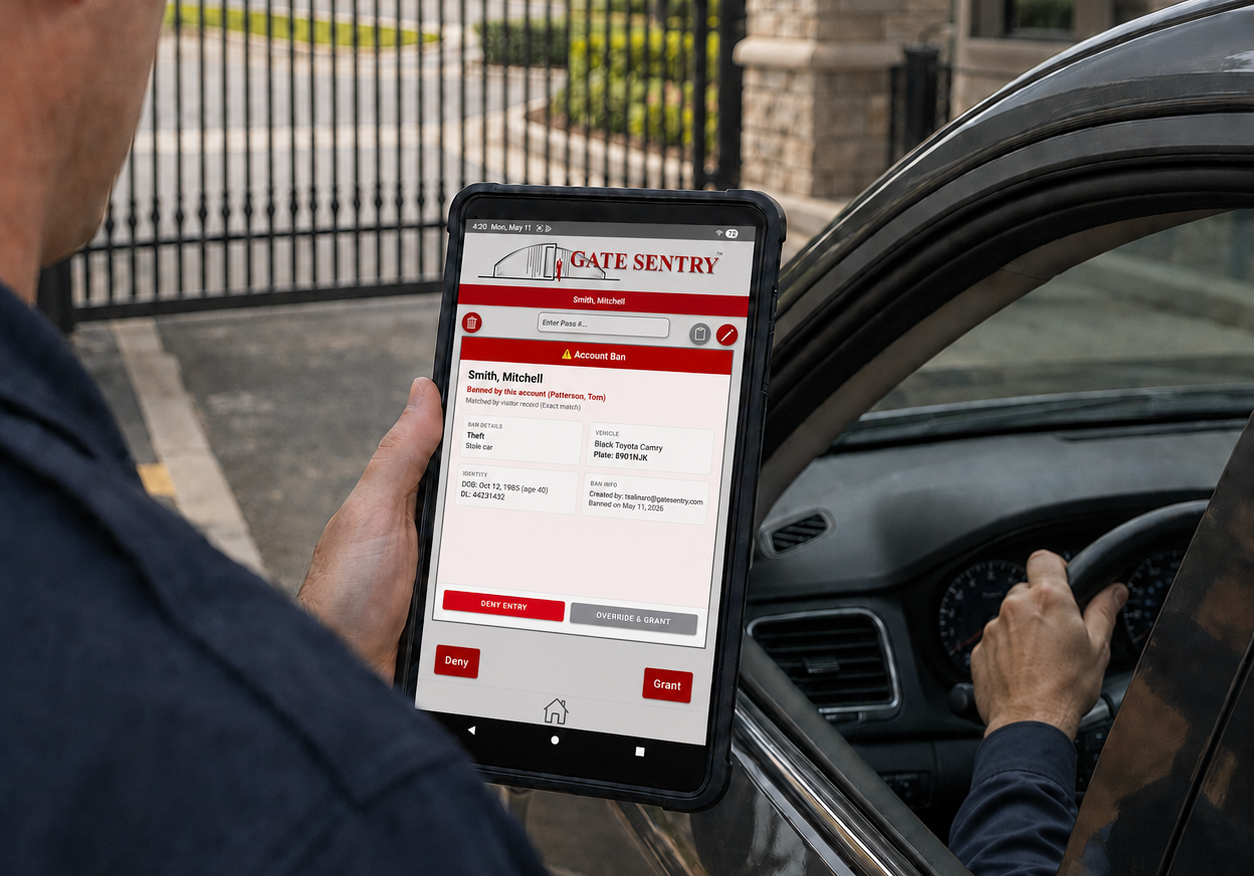
When someone with an active property-wide ban tries to enter, the system throws up a red alert on the guard's tablet. The instruction is simple: deny entry and follow community enforcement protocols.
The color-coded alert system also draws a clear line between the two ban types, so guards get context instead of a blanket block:
- 🔴 Red pop-up (stop). Indicates either an account ban for the specific house being visited or a property-wide ban. Red means stop and deny entry.
- 🟠 Orange pop-up (heads-up). An account ban warning. This means a different household banned this person, but the household they are visiting today has not. It provides context without an automatic block, allowing the guard to use approved community judgment.
This distinction prevents one resident's personal grudge from locking a visitor out of the entire neighborhood, while ensuring guards are never left blind to potential risks.
Verification Details Over Simple Name Matches
Common names like "John Smith" create false positives all the time. To keep guards from denying the wrong person, the system pulls up multiple identity fields at once:
- Ban details. The explicit incident classification (e.g., harassment) alongside admin notes.
- Identity information. Date of birth, calculated age, and driver's license or ID number.
- Vehicle data. The make, model, color, and license plate number so guards can verify the car before the driver even rolls down their window.
- Audit info. Exactly who created the ban and the date it was placed.
Managing Bans from the Admin Dashboard
Everything runs through the Community Ban List in the main dashboard. Summary tiles show active bans at a glance, and separate tabs track past bans and the full audit log.
When an incident escalates, adding a restriction requires precise data entry to ensure legal and operational defensibility.
- Select restriction level. Required. Choose between a property-wide ban or an account-level ban to define the scope of protection.
- Define the classification. Required. Categorize the individual as a guest, vendor (company), or vendor (employee). This allows you to restrict one problematic employee without blocking the entire vendor company your community relies on.
- Log identity and vehicle data. Name required. Enter the first and last name manually, or use the "Search from Logs" feature to pull historic badge data directly. Add optional identifying details like date of birth, ID numbers, and vehicle license plates.
- Document the incident. Required. Select the mandatory incident reason from the dropdown menu and add brief supporting details (up to 100 characters) to ensure the ban is fully documented and legally defensible.
- Upload photo evidence. Optional. Attach up to 5 images, such as physical IDs, vehicle photos, or incident evidence, so guards have immediate visual verification at the gate.
Once you save it, the ban shows up at every guard station right away. Admins can edit, delete, or bump an account-level ban up to a property-wide ban straight from the portal if a personal dispute turns into a community-wide safety issue.
Accountability and Legal Defensibility
What happens after a banned individual is turned away matters just as much as the block itself. Every attempted entry by a restricted person triggers an automatic alert to security personnel and gets stamped into the Entry Logs.
That paper trail does three things for HOAs and property managers:
- Guard accountability. If a guard chooses to override a ban, that specific decision is permanently tied to their user profile.
- Pattern evidence. Repeated unauthorized entry attempts build a documented paper trail of criminal trespassing, which gives law enforcement or legal counsel something concrete to work with.
- Resident confidence. When homeowners ask how a security threat was handled, management can point directly to objective, timestamped log entries rather than relying on a guard's memory.
The Bottom Line
Property-wide bans give community management one tool for handling the incidents that really matter. Turn it on once, and it protects every home, every gate, and every entrance from that point forward.
Looking to upgrade your community's access control workflow?
Get in touch with our team to learn more about deploying property-wide bans in your community with Gate Sentry. We'll walk your board through the setup, the guard workflow, and the audit trail on a live demo.
Schedule a Board DemoFrequently Asked Questions
What is a property-wide ban in a gated community?
A property-wide ban is an admin-driven access restriction that applies across the entire perimeter of a gated community. Unlike a household-level ban, which only protects one specific address, a property-wide ban blocks the individual from every home, every gate, and every entrance, regardless of which resident they claim to be visiting.
What is the difference between an account-level ban and a property-wide ban?
An account-level ban is set by an individual household and applies only to that household. A property-wide ban is set by community management or a security administrator and applies across every home in the community. Account-level bans are best for personal disputes, while property-wide bans are used for serious incidents affecting community safety.
How do guards enforce bans at the gate?
When a banned individual attempts entry, Gate Sentry's system displays a color-coded alert on the guard tablet. A red pop-up signals stop and deny entry for property-wide bans or account bans matching the household being visited. An orange pop-up provides a heads-up when a different household has banned the individual but the current household has not. Every interaction is logged automatically.