
HOA Parking Management Software: Digital Parking Permits
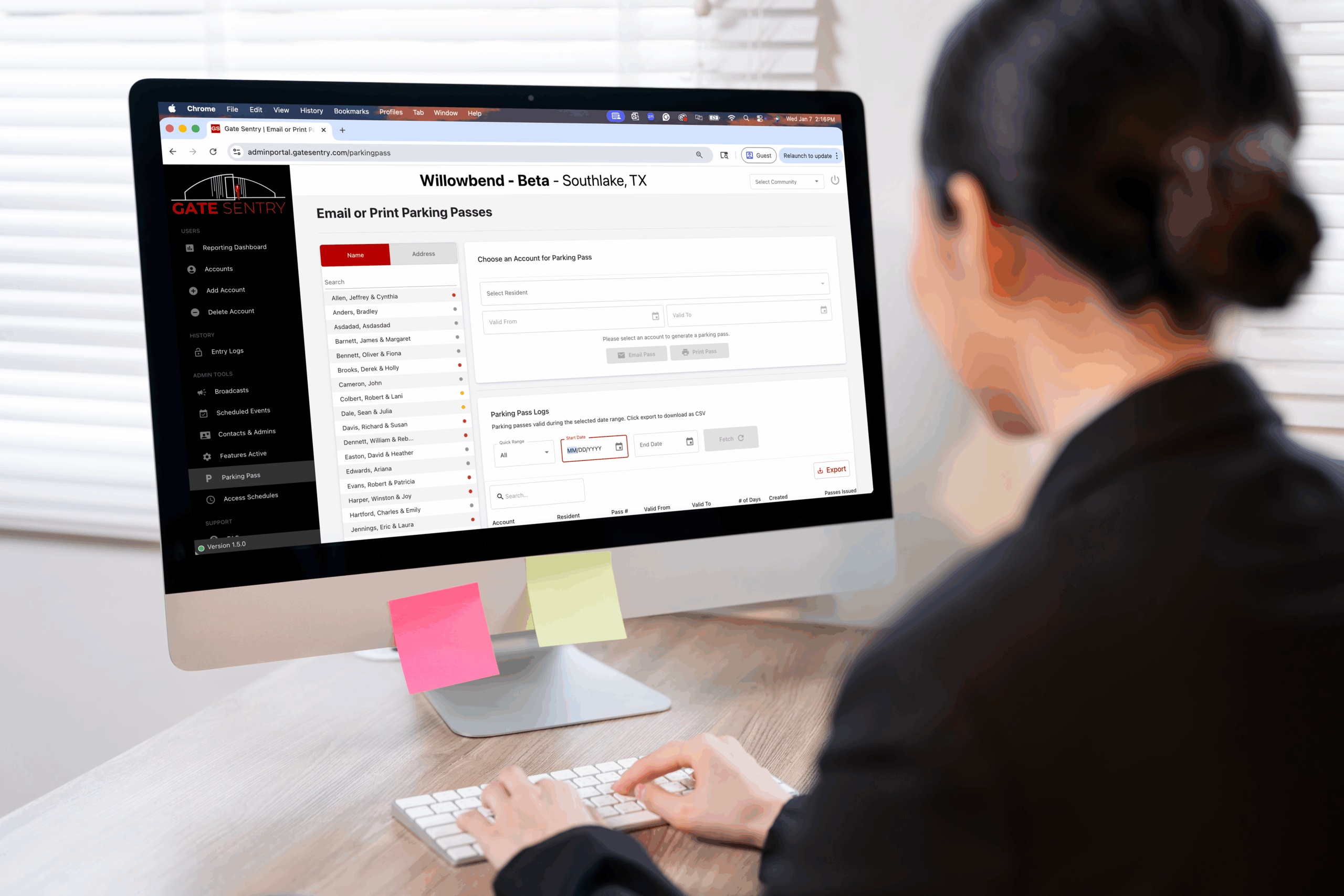
Parking can be one of the most frustrating things for HOA managers to deal with.
A resident needs to park on the street for a few days because they're having work done on their driveway. They contact management, get permission, and assume everything is taken care of.
But what happens if the security team doesn't know about that approval?
Now the resident is worried about getting towed, the security officer is trying to figure out whether the car is allowed to be there, and management is getting another phone call about parking.
It's the kind of situation that can turn something pretty simple into a much bigger headache.
For communities with strict parking rules, having a clear way to issue and keep track of parking permits can make a big difference.
That's why Gate Sentry includes a Parking Pass feature directly in the admin portal, allowing property managers to create temporary parking permits without having to manage everything through handwritten passes, spreadsheets, or separate software.
Why Parking Can Be Such a Headache for HOAs
Most gated communities and multifamily properties have some type of parking policy.
Some don't allow street parking at all unless a resident receives special permission. Others restrict overnight parking or require permits for guests and additional vehicles.
The rules themselves might be straightforward, but keeping track of who's been given permission isn't always as easy.
Say a resident has family visiting for the weekend and needs approval for an extra vehicle.
Management agrees, but how does that information get to the security officer patrolling the neighborhood that night?
Does someone send an email? Add a note to a spreadsheet? Call the security team and hope the message gets passed along?
And if the community works with a towing company, how does that company know the vehicle has been approved?
These are the kinds of situations where parking disputes can start.
A resident believes they have permission, while the person responsible for enforcing the rules doesn't have anything showing that approval.
Even when everyone is trying to follow the community's policies, it's easy for information to get missed.
Giving Residents Something That Actually Shows They're Approved
One way to make parking easier to manage is to give residents a permit that clearly shows when they've been authorized to park.
With Gate Sentry, property managers can create parking passes directly through the admin portal.
Each pass includes information such as the resident's name, address, pass number, and approved dates, along with the community's logo.
The pass can be emailed to the resident to print or printed directly by management.
Once the resident receives it, they place it on their vehicle's dashboard where it can be seen during parking checks.
That way, when a security officer comes across a vehicle parked in an area where permits are required, they have something to reference.
Instead of automatically assuming the vehicle shouldn't be there, they can review the displayed permit and follow the community's parking procedures.
For residents, it's also reassuring to have something showing that their request was approved.
How Parking Passes Work in Gate Sentry
We wanted the process to be simple for property managers, especially since temporary parking requests are usually something they need to handle quickly.
When a resident needs a parking permit, an authorized administrator can create one through the Gate Sentry admin portal.
Here's how it works:
1. Select the resident
Management finds the resident's account and selects the property address associated with the parking request.
2. Choose the approved dates
The administrator enters the dates the permit should be valid.
For example, if a resident needs temporary street parking while their driveway is being repaired, management can issue a pass for those specific days.
3. Send or print the pass
The parking pass can be emailed to the resident or printed directly from the admin portal.
The resident prints it and places it on their vehicle's dashboard.
4. Keep a record of the approval
Every pass issued is recorded in Gate Sentry, including its pass number, associated resident, address, and valid dates.
This means management has a record to reference later if there's ever a question about whether a vehicle was authorized to park.
And because the feature is built into Gate Sentry, administrators don't need to use another platform just to issue a parking permit.
Making Parking Enforcement Easier for Security Officers
Think about a security officer patrolling a community with no overnight street parking.
They come across several vehicles parked along the street.
One belongs to a resident who received temporary approval because their driveway is being repaired. Another belongs to someone who doesn't have permission to park there.
Without a clear permitting process, the security officer may have to call management, search through records, or try to determine whether either vehicle has been approved.
With visible parking passes, they can review the permits displayed on the dashboards.
If a vehicle has a pass showing the appropriate dates, the officer has documentation to consider when checking whether the vehicle is authorized.
If there's no pass or the dates have expired, they can follow the community's established verification and enforcement procedures.
This doesn't mean a printed permit replaces every other parking rule or automatically determines whether a vehicle should be towed.
But it does give security officers a more consistent way to check temporary parking approvals.
And that can help avoid unnecessary confusion between residents, security teams, and property management.
What Happens When Someone Questions a Parking Decision?
Parking disputes aren't always resolved on the day they happen.
A resident might call the management office the next morning and say they received permission to park somewhere, but their vehicle was still cited or towed.
Now management has to figure out what happened.
Was a parking pass actually issued? What dates was it valid? Was the approval still active when the vehicle was checked?
If the community is keeping track of these requests through emails or paper notes, finding that information can take some time.
Gate Sentry keeps a digital record of the parking passes administrators issue.
Management can review the pass details rather than trying to remember whether someone approved the request.
Having that record doesn't guarantee there won't be parking disputes, but it gives management something concrete to reference when questions come up.
Which Communities Would Benefit From Parking Passes?
Not every HOA handles parking the same way.
Some communities have plenty of parking and rarely need to issue temporary permits. Others have strict rules that require management approval for almost any exception.
A few situations where parking passes can be particularly helpful include:
- Communities with no street parking: Residents occasionally need permission to park outside their driveway or garage because of repairs, construction, or other temporary circumstances.
- Communities with overnight parking restrictions: Guests or residents with additional vehicles may need approval for specific nights.
- Gated communities with security patrols: Security officers need a clear way to check whether vehicles have permission to park.
- Multifamily properties: Limited parking and shared spaces can make it difficult to manage temporary parking requests.
- Communities that use towing companies: Visible permits and documented approvals can help communicate parking exceptions and reduce confusion during enforcement.
The important thing is having a process that works with the community's existing parking rules.
Why We Built Parking Passes Into Gate Sentry
A lot of property managers already use several different systems throughout the day.
They might have one platform for resident information, another for visitor management, and spreadsheets or paper records for parking requests.
Adding another piece of software just to manage temporary parking permits isn't always practical.
That's why we included parking passes in the same Gate Sentry admin portal that communities already use to manage visitor management and access.
If a resident calls requesting a temporary parking permit, management can issue it through the existing system instead of switching to another platform.
And when someone has a question about an approval, the record is available in that same place.
It's a fairly simple feature, but for communities that regularly deal with parking exceptions, it can cut out a lot of unnecessary back-and-forth.
A Better Way to Handle Parking Requests
Going back to the resident having work done on their driveway, the parking request itself isn't complicated.
They need permission to park somewhere temporarily, and management needs a way to communicate that approval.
The problem starts when nobody can easily confirm whether permission was given.
With Gate Sentry's Parking Pass feature, management can issue a dated permit, the resident can display it in their vehicle, and the security team has something to check during patrols.
And if a question comes up later, the approval is recorded in the system.
For property managers who already spend enough time responding to parking complaints, having a more organized process can make those situations much easier to handle.
See How Gate Sentry's Parking Pass Feature Works
Does your community deal with temporary parking requests, overnight restrictions, or parking permit disputes? We'd be happy to show you how Gate Sentry helps property managers issue parking passes and keep track of approvals.
Schedule a Demo