
Replace HOA Key Fobs & Cards with Mobile Access Control
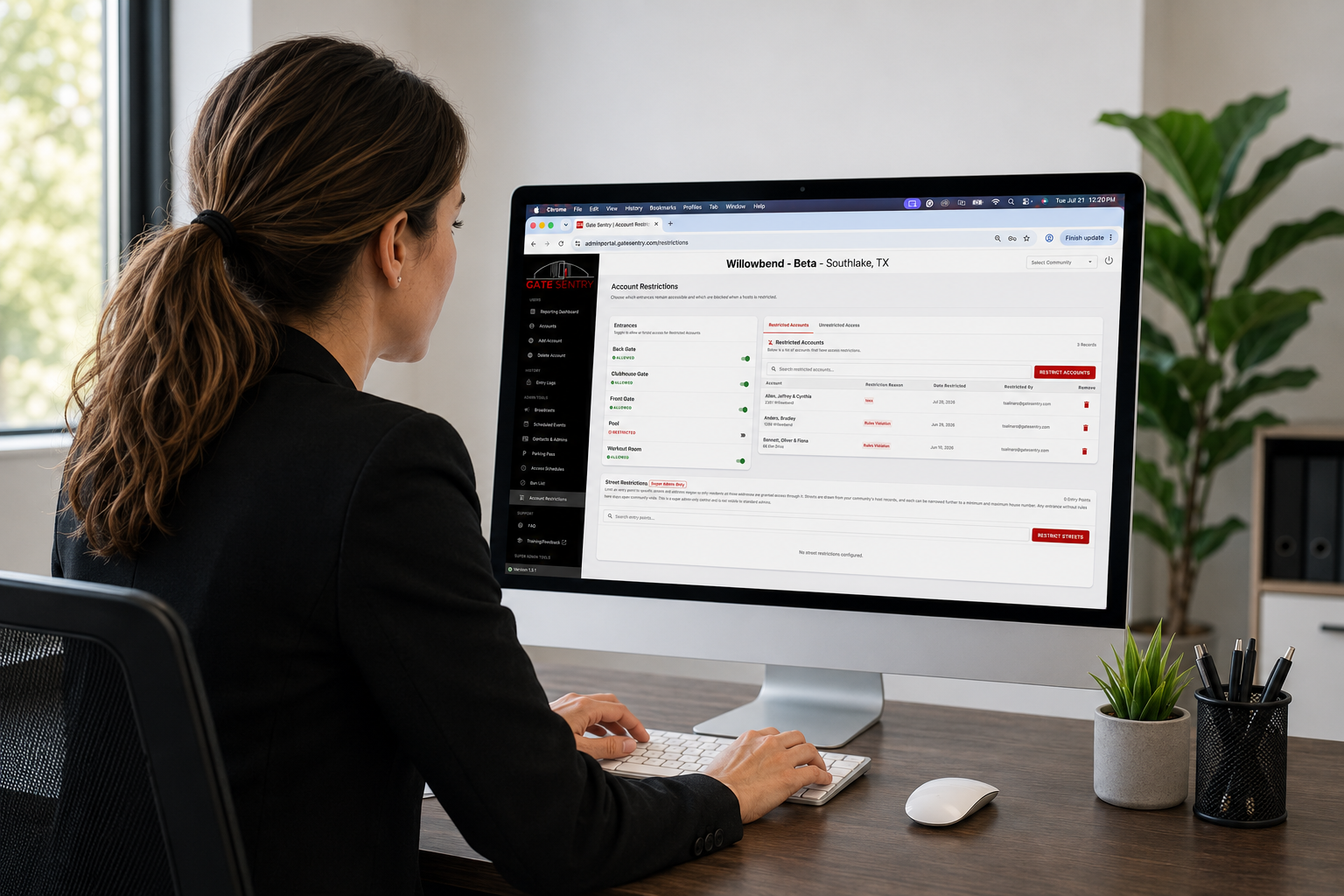
The Quick Summary
VirtualKey is account-based access control. Instead of assigning gate and amenity permissions to a key fob or access card, Gate Sentry assigns them to the resident's account. Their phone becomes their credential, and every permission change happens from a single cloud dashboard in seconds.
No replacing fobs, no mailing cards, no wondering which credential belongs to whom.
What This Guide Covers
- Do you really know who has access?
- Where credential sprawl comes from
- The industry has been solving the wrong problem
- What if you didn't have to manage credentials at all?
- Three access profiles, one simple system
- A better experience for residents too
- Traditional access control vs. VirtualKey
- Frequently asked questions
Do You Really Know Who Has Access to Your Community?
Here's a question every property manager and HOA board member should ask themselves.
If you needed to change a resident's access right now, could you do it in less than a minute?
Not after calling your access control vendor. Not after digging through old spreadsheets. Not after figuring out which key fob belongs to which resident. Right now.
For many communities, the answer is no.
That might sound surprising, especially if your gates open every day without a problem. Residents come and go. Visitors check in. The pool stays open. Everything appears to be working exactly as it should.
Until something changes. That's when many communities discover they're spending more time managing key fobs than managing access.
The Problem Usually Doesn't Start With Technology
No property manager wakes up one morning and loses control of their access system. It happens gradually.
A resident loses a key fob, so a replacement is issued. A homeowner requests an extra access card for a family member. A management company changes, inheriting years of resident records from the previous company. The community upgrades its access control system and imports an old database. A board member steps down. A maintenance contractor finishes a project.
None of those situations are unusual. In fact, they're part of everyday community management.
The problem is that every one of those events adds another layer of complexity. After enough years, keeping track of physical credentials becomes its own job, and it gets harder to answer what should be a simple question:
Who actually has access to the community today? Not who should have access. Who actually does.
Everything Works Fine Until Someone Needs Different Access
On most days, nobody notices the problem. Residents tap their key fobs. The gate opens. The clubhouse unlocks. Life goes on.
Then one afternoon the board asks you to suspend a resident's amenity privileges because they're several months behind on HOA dues. Or someone repeatedly violates pool rules. Or a former board member no longer needs access to a maintenance building.
Whatever the reason, someone needs different access than they had yesterday.
That should be simple. Instead, it turns into an investigation. Which credential are they using? Do they still have an older access card? Was another credential ever issued? Did everything transfer correctly when the community switched systems three years ago?
These aren't questions property managers should have to ask. Unfortunately, they're common whenever access is tied to physical credentials instead of the people using them.
The Industry Has Been Solving the Wrong Problem
For decades, access control companies focused on making better hardware: better keypads, better key fobs, better controllers.
But they never changed the way access was managed. The resident was never the focus. The credential was.
Every permission was attached to a key fob or an access card. Lose the credential? Issue another one. Need to change access? Update the credential. Need to restrict amenities? First figure out which credentials belong to that resident.
The more physical credentials a community has, the more administrative work it creates.
What If You Didn't Have to Manage Credentials at All?
That's the question we asked when building VirtualKey.
Instead of assigning permissions to a key fob or access card, we assign them to the resident's account.
Residents simply download the Gate Sentry app and sign in with their email address. That's it. Their phone becomes their VirtualKey, and from that point forward, every permission follows the resident instead of a piece of plastic.
New phone? They sign in again. Different access needed? You update their account, from a single cloud-based dashboard.
No replacing key fobs. No mailing access cards. No wondering whether you updated the correct credential.
Changing Access Takes Less Than 10 Seconds
This is where account-based access changes the experience for property managers.
Let's say a resident's amenity privileges need to be suspended:
- Open the Gate Sentry admin portal.
- Search for the resident.
- Select their account.
- Choose Restricted Access.
- Click Save.
You're done. The update takes effect in seconds.
No service call. No reprogramming. No hardware to replace. The resident's VirtualKey instantly reflects the new permissions because those permissions live on their account, not inside a key fob.
Instead of tracking which credential belongs to whom, property managers only have to manage one thing: the resident's account.
Three Access Profiles. One Simple System.
As communities grow, permissions multiply. Residents, board members, contractors, and maintenance staff all need different levels of access, and traditional systems answer that with more fobs, more cards, more shared PIN codes, and more physical keys.
Sentry Solo answers it with three simple access profiles, changeable at any time from the admin portal.
Standard Access
The default profile for residents in good standing.
Their VirtualKey opens the entrances and amenities they're authorized to use: the community entrance, clubhouse, pool, fitness center, mailroom, and other shared facilities.
For the vast majority of residents, this is the only profile they'll ever need.
Restricted Access
Sometimes communities need to enforce their governing documents.
A resident may fall behind on HOA dues. Someone may repeatedly violate amenity rules. A homeowner could temporarily lose facility privileges after damaging community property.
With Sentry Solo, enforcement takes seconds. Open the resident's account, select Restricted Access, and save.
The resident immediately loses access to the amenities you've selected while continuing to access the entrances they still need, such as the community gate or mailroom. They can always get home. They just can't use the pool.
No key fob to replace. No access card to collect. No call to your access control vendor.
Additional Access
Not everyone in a community should have the same permissions.
Board members may need access to private meeting rooms. Maintenance staff may need utility buildings and equipment rooms. Property managers may need every entrance on the property.
Instead of handing out master keys or creating shared keypad codes, assign an Additional Access profile. The person keeps using the same VirtualKey they already have. The only thing that changes is what their account is authorized to open.
Every entry is recorded in the activity log, giving administrators a clear audit trail of who accessed what, and when.
A Better Experience for Residents Too
Property managers aren't the only ones who benefit.
Residents no longer carry another fob on their keychain or worry about replacing a lost access card. They sign into the Gate Sentry app with their email address, and their VirtualKey is ready.
If they upgrade to a new phone, they download the app, sign in, and keep going. No waiting for a replacement credential. No programming fees. No trip to the management office.
Traditional Access Control vs. VirtualKey
| Feature | Traditional Key Fobs & Access Cards | VirtualKey |
|---|---|---|
| Resident credential | Physical key fob or access card | Smartphone logged into the Gate Sentry app |
| Permissions | Assigned to each physical credential | Assigned to the resident's account |
| Updating access | Update physical credentials or local databases | Update the account in the admin portal, in seconds |
| Lost credential | Replace and program a new fob or card | Sign into the app on a new phone |
| Enforcing amenity rules | All-or-nothing: deactivate everything or nothing | Restrict amenities; community entry stays active |
| Audit trail | Based on credential numbers | Based on the resident's account |
The difference may seem small, but it completely changes how communities manage access.
One approach is built around hardware. The other is built around people.
What Communities Actually Want Isn't Better Hardware
Managing access shouldn't feel like managing inventory.
Communities don't want more sophisticated key fobs. They want confidence.
Confidence that the right people have access. Confidence that changing permissions won't turn into an afternoon project. Confidence that when someone needs different access, it can be updated immediately.
That's what account-based access provides.
The Future of Community Access Isn't Another Key Fob
Physical credentials made sense twenty years ago. Today, they create unnecessary work for property managers and unnecessary inconvenience for residents.
Communities deserve something simpler. Instead of tracking key fobs, replacing access cards, and wondering who still has an active credential, property managers should be able to manage access the same way they manage everything else: through the cloud.
That's exactly what VirtualKey delivers.
Every resident has one account. Every permission is managed in one place. Every change takes seconds.
So the next time the board asks you to change someone's access, you can say yes, and have it done before the meeting ends.
Ready to answer "who has access?" with confidence?
Schedule a demo with the Gate Sentry team and see how VirtualKey and Sentry Solo can modernize your community.
Schedule a DemoFrequently Asked Questions
Can we restrict amenity access without affecting community entry?
Yes, that's one of the biggest advantages of account-based access. Property managers can restrict access to amenities such as pools, clubhouses, or fitness centers while leaving community entrances and other approved access points unchanged.
Does this eliminate physical key fobs?
Yes. VirtualKey replaces physical credentials with secure mobile access. Residents use their smartphones instead of carrying separate key fobs or access cards.