
HOA Amenity Access: Pools, Courts and Clubhouses
The pool is too crowded on Saturday. Someone let their friends into the tennis courts after hours. A resident noticed people using the clubhouse who don't live in the community.
These are the kinds of amenity complaints we hear from HOA boards and property managers.
And they're not always easy to handle.
Most communities have different rules for their pools, tennis and pickleball courts, gyms, and clubhouses. Some are reserved for residents. Others allow guests. Hours change throughout the year, and certain areas may be closed for maintenance or private events.
Keeping track of all that can become a lot of work, especially when the property still uses physical keys, fobs, or shared access codes.
Here's how communities can manage those entrances without making residents carry a separate credential for every amenity.
Why Amenity Access Is Hard to Manage
The main community gate usually has one primary purpose: controlling entry to the property.
Amenities are a little different.
The pool may close at 9 p.m., while the fitness center stays open much later. The tennis courts may allow guests, but only when accompanied by a resident. A clubhouse might be available for private events on certain days.
Management has to consider several things:
- Different operating hours for each amenity.
- Whether guests are allowed and which entrances they can use.
- Seasonal closures, holidays, and maintenance.
- Restrictions following rule violations, where permitted.
- Removing access when someone moves out.
These aren't necessarily difficult policies to establish. The challenge is making sure the access system follows them.
A pool gate that's supposed to close at 9 p.m. shouldn't continue accepting credentials all night simply because someone forgot to update the schedule.
And a former resident shouldn't keep using the gym because nobody collected their fob after they moved.
The Problem With Fobs, Keys, and Padlock Codes
Physical credentials can work well, but they also create ongoing responsibilities for management.
A resident loses their pool fob and needs a replacement. Someone lends their tennis court key to a friend. A padlock code gets shared with several households and eventually becomes difficult to control.
Then someone moves out, and management has to determine which credentials they were issued and whether those credentials have been returned or deactivated.
Depending on the system, removing an old fob may require reprogramming equipment or contacting a service provider.
And if several amenities use different systems, management has to repeat that process for each one.
For communities considering the ongoing costs of physical credentials, we cover that in more detail in replacing HOA key fobs and cards with mobile access.
Mobile Access for Amenities
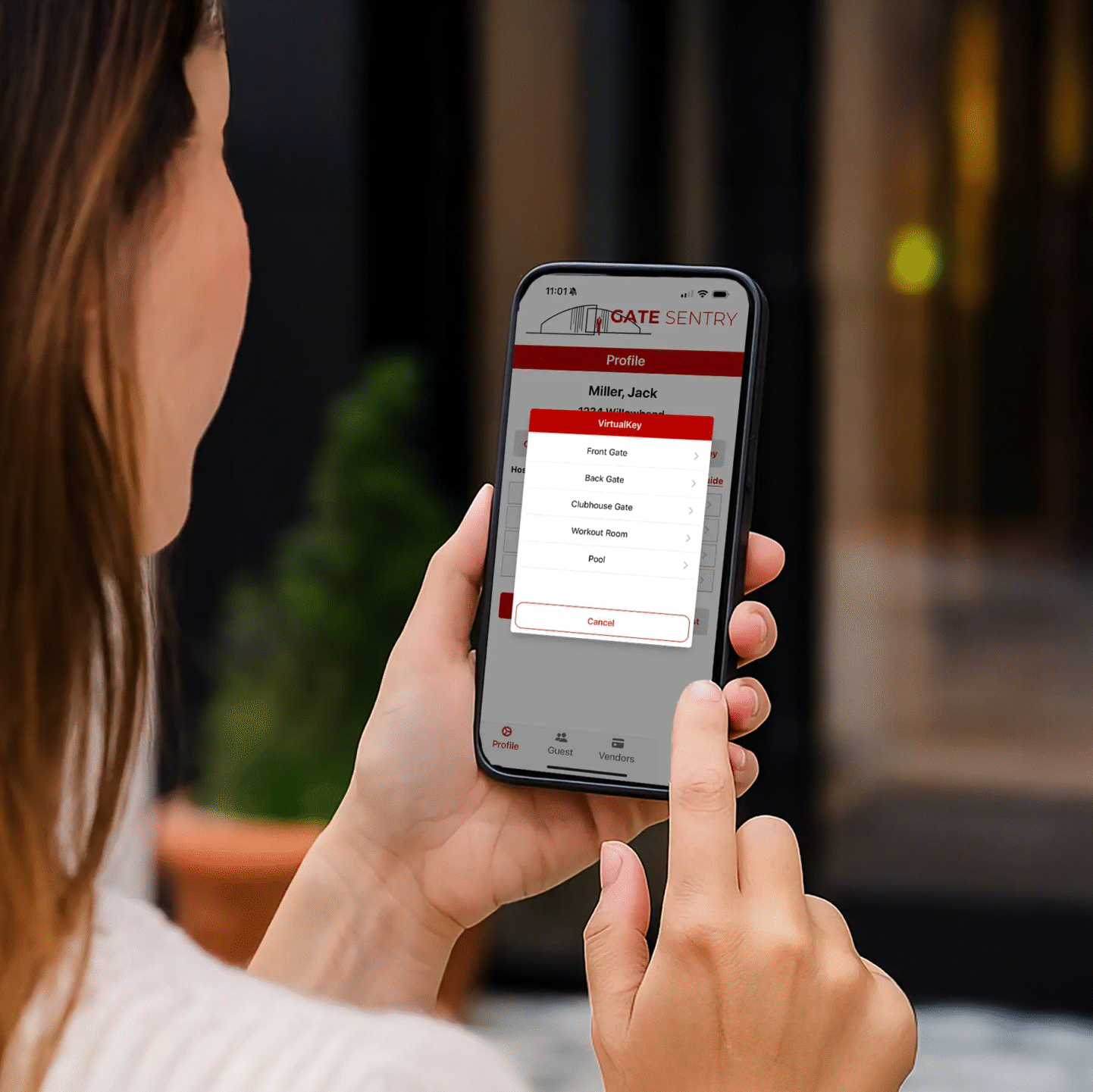
With Sentry Solo, residents can use VirtualKey in the Gate Sentry app to open compatible amenity entrances they're authorized to access.
That could include the pool gate, fitness center, clubhouse, or tennis courts.
A resident who already uses VirtualKey at the community gate can use the same app at their other approved entrances.
There's no need for a separate pool fob or clubhouse card if those entrances are configured for VirtualKey.
Management controls which entrances are available to each resident account.
When someone moves out, their supported access can be removed through the administrative portal rather than relying on the return of a physical credential.
Of course, the existing gate or door still needs to be compatible with the system. Some entrances may require additional components.
For more on how Sentry Solo works across a property, see mobile gate access for unmanned gated communities.
Setting Hours and Rules for Each Amenity
One of the more useful things about managing amenity access digitally is being able to set different rules for different entrances.
With Access Scheduler, administrators can manage when residents, guests, vendors, and configured groups are permitted to use compatible entrances.
For example:
| Situation | How the community can handle it |
|---|---|
| Pool closes at 9 p.m. | Set weekly access hours for the pool gate |
| Courts are reserved for residents | Limit approved access to the appropriate resident groups |
| Pool closes for maintenance | Create a temporary access restriction |
| Clubhouse event runs late | Extend the approved access schedule for that evening |
| Household has an amenity restriction | Use Account Restrictions for the designated entrances |
| Resident moves out | Remove their supported access through the admin portal |
Each entrance can have its own schedule.
Changing the pool hours doesn't require changing the main gate's operating hours.
The system also supports temporary schedule overrides, so management can make a change for an event or closure without permanently modifying the regular schedule.
There are situations where an HOA may need to restrict an individual household's amenity access.
Gate Sentry's Account Restrictions feature allows authorized administrators to apply configured restrictions to selected entrances and keep a record of the restriction.
Whether an HOA can restrict an amenity for a particular reason depends on the community's governing documents and applicable law. That's a board and management decision, not something the software determines.
Guests and Amenities
Some communities allow residents to bring guests to the pool or tennis courts.
Others restrict certain amenities to residents only.
Sentry Solo can support either approach.
For guests who are authorized to use an unmanned entrance, the community can provide SoloPass or VirtualKeypad access, depending on its configuration.
With SoloPass, the invited guest opens their pass on their phone and taps to open the approved entrance.
With VirtualKeypad, the guest scans the SentrySign QR code and enters their assigned access code in their phone's browser.
The important part is that the community decides which entrances guests are permitted to use.
Someone who has access to the main gate shouldn't automatically have permission to enter the pool or clubhouse.
For larger gatherings at properties with staffed gates, Gate Sentry's Events feature also allows organizers to create separate event guest lists.
Those lists are available to security during the scheduled event and no longer appear as active event lists afterward.
Vendors Who Service Amenities
Amenities also need regular maintenance.
Pool companies, court resurfacing crews, cleaning services, and gym equipment technicians may all need access at different times.
With Sentry Solo, approved vendors can receive individual VirtualKeypad codes.
At the entrance, they scan the SentrySign QR code and enter their code through the browser-based keypad.
Access Scheduler allows management to establish the hours when vendor credentials can be used at each entrance.
For example, a pool maintenance company may be permitted to enter on Tuesday mornings without having access to the pool area every evening.
If their service arrangement changes, management can update the relevant access permissions.
That avoids relying on a shared code that continues circulating long after a vendor stops working at the property.
Using Entry Records to Plan Amenities
Amenity access records can also be useful when boards are making decisions about maintenance or improvements.
Maybe the HOA is considering resurfacing a second tennis court.
Or management wants to know whether a particular amenity entrance is being used regularly.
Sentry Solo records supported access activity, which administrators can review to understand how often credentials are used at different entrances.
Those records can show patterns in recorded gate or door openings.
They don't necessarily show how many people used an amenity, though.
One resident might open the pool gate for several family members, and someone could follow another person through an entrance.
It's useful information, but it should be considered alongside reservations, resident feedback, and other observations when making spending decisions.
One Thing Access Control Can't Fix
A resident opens the pool gate, and someone follows them inside.
No mobile credential, fob, or keypad can completely prevent that on its own.
The same goes for someone letting an unauthorized guest enter behind them.
Access control helps determine who has permission to open an entrance. It doesn't guarantee that everyone who walks through has been individually verified.
Gate design, community rules, and resident awareness still matter.
Questions to Settle Before Changing Amenity Access
Before installing a new amenity access system, I'd want management and the board to answer a few questions.
Which amenities allow guests?
What are the regular hours, and how do they change seasonally?
Who can approve restrictions after a rule violation?
What should happen to existing fobs and keys?
And which doors or gates are compatible with the proposed system?
It's much easier to configure access once the community has decided how each amenity should operate.
It also gives management clear information to share with residents during the transition.
Frequently Asked Questions
Can residents open the pool or tennis court gate with their phone?
Yes. With Sentry Solo, residents can use VirtualKey in the Gate Sentry app at compatible amenity entrances they're authorized to access.
Can each amenity have its own operating hours?
Yes. Access Scheduler allows administrators to establish different schedules for individual entrances, including pools, clubhouses, and other controlled amenities.
Can a community restrict amenity access for one household?
Gate Sentry's Account Restrictions feature supports restrictions on designated entrances. Communities should apply those restrictions according to their governing documents and applicable laws.
Can residents bring guests to amenities?
If the community allows guest access, invited guests can use SoloPass or VirtualKeypad at supported unmanned amenity entrances.
What happens when a resident moves out?
Management can remove the resident's supported access through the Gate Sentry admin portal. Any unrelated physical credentials or systems still need to be addressed separately.
See Amenity Access in Action
If your community is managing pool gates, courts, gyms, and clubhouses with separate credentials, we can show you how Sentry Solo works at compatible entrances. We'll walk through resident access, guest permissions, operating hours, and administrative controls.
Schedule a Demo