
Gate Keypads, Kiosks & Mobile Access: 2026 Buyer's Guide
The Quick Summary
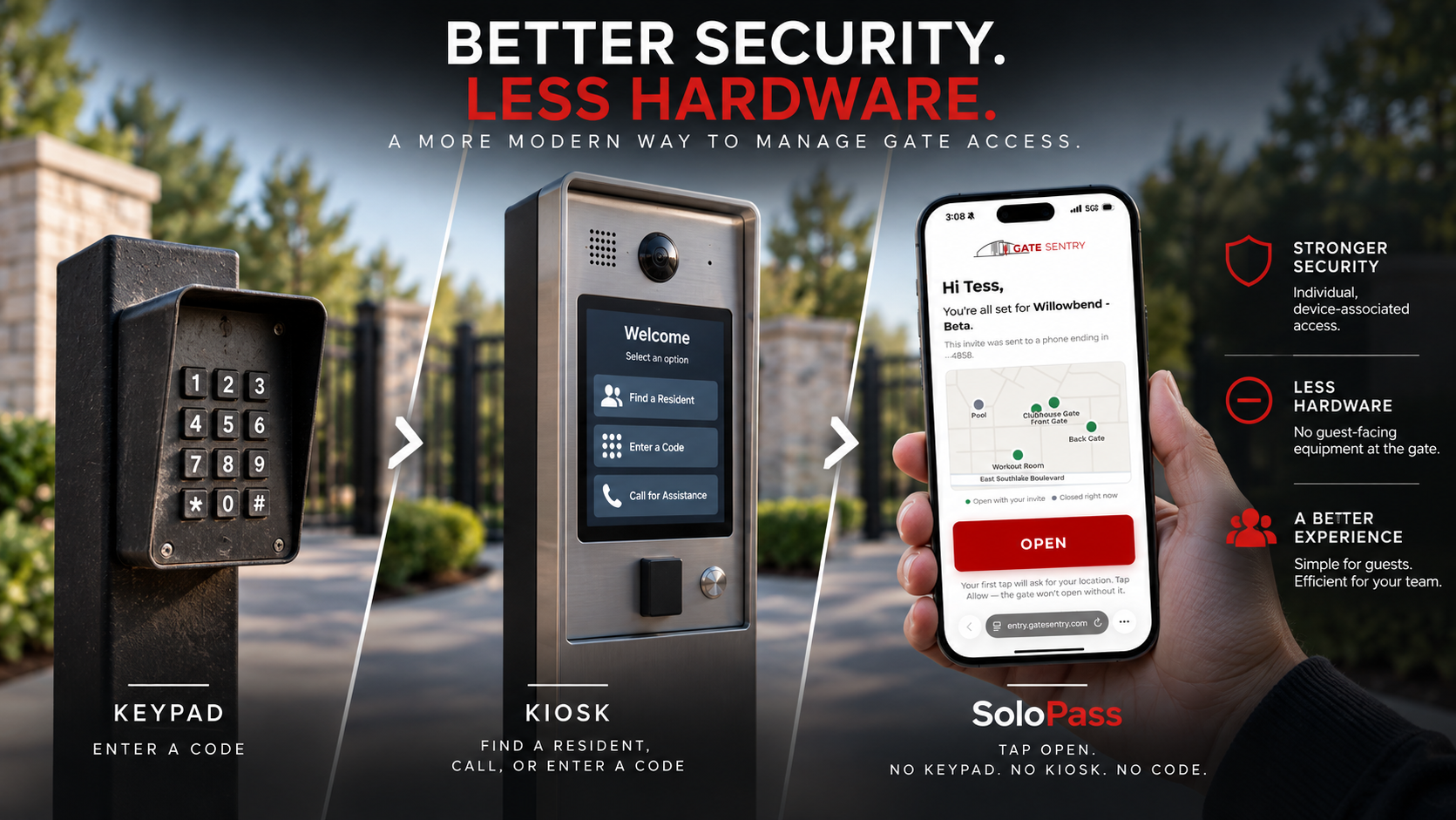
For decades, unmanned gate access has been built around hardware at the entrance: keypads, callboxes, telephone entry systems, and touchscreen kiosks. The technology improved, but the model stayed largely the same: install a device at the gate and ask the visitor to interact with it.
Gate Sentry's Sentry Solo takes a different approach by moving the access experience to the phone the visitor already carries. This guide compares traditional gate keypads and kiosks with phone-first access and asks a question buyers haven't historically had to consider: do you need a guest-facing device at the gate at all?
What This Guide Covers
- Gate keypad vs. gate kiosk
- The hidden cost of hardware
- The industry kept improving the hardware
- The shift to phone-first gate access
- SoloPass: mobile visitor access without a keypad or kiosk
- Gate keypad vs. kiosk vs. SoloPass
- Do you still need physical gate hardware?
- Questions to ask before buying
- Frequently asked questions
Gate Keypad vs. Gate Kiosk
A gate keypad is primarily designed for code-based entry. A visitor enters a PIN or access code, and the gate opens if the credential is valid.
A gate kiosk adds functionality such as a resident directory, calling, video, or intercom. It can be useful when unexpected visitors need to locate and contact someone inside the property.
| Factor | Gate Keypad | Gate Kiosk |
|---|---|---|
| Primary purpose | Code-based entry | Directory, calling and access |
| Guest interaction | Enter a code | Enter a code or contact resident |
| Physical hardware | Yes | Yes |
| Power required | Yes | Yes |
| Connectivity | System dependent | Commonly required |
| Resident directory | Usually no | Often |
| Intercom | Usually no | Often |
| Outdoor equipment to maintain | Yes | Yes |
If the primary requirement is simple entry using a PIN, a keypad may be sufficient. The tradeoff is that credentials can be shared, and depending on the system, the property may know which credential was used without knowing who actually used it.
If unexpected visitors need to locate and contact residents, a kiosk or intercom provides more functionality. The tradeoff is more physical equipment at the entrance to purchase, install, connect, maintain, and eventually replace.
The Hidden Cost of Hardware
The purchase price is only part of the cost. Gate hardware may also require installation, power, wiring, trenching, connectivity, software, maintenance, service, and eventual replacement.
Outdoor electronics are exposed to heat, cold, rain, dust, direct sunlight, vehicles, and constant use. Touchscreen kiosks also contain multiple components that need to keep working, including the display, touch interface, camera, intercom, connectivity, and internal electronics.
Every piece of hardware at the gate is another potential point of failure and another piece of equipment the property has to maintain, repair, or replace.
This is why buyers should look beyond the initial equipment price and consider the full lifecycle:
The Industry Kept Improving the Hardware
The evolution of unmanned gate access has traditionally looked something like this:
Keypad → connected keypad → callbox → touchscreen kiosk
Each generation made the device more capable, but the underlying model remained the same: put hardware at the gate and make the visitor use it.
The access-control industry has become very good at building better gate hardware. Sentry Solo questions the assumption that more hardware is the answer.
Instead of asking what new device should replace the old one, Gate Sentry asks:
Does the visitor need dedicated hardware at all?
The Shift to Phone-First Gate Access
The visitor already arrives with a connected screen in their hand: their phone.
Sentry Solo moves the access experience there.
Instead of relying on one guest-facing device for everyone, Sentry Solo provides different ways to enter based on who is arriving:
- VirtualKey for residents
- SoloPass for invited guests
- Mobile VirtualKeypad for vendors
- Mobile Intercom for visitors who arrive without being added ahead of time
The property doesn't have to provide the screen. The visitor brings it.
This reduces the amount of guest-facing equipment sitting outside that has to be installed, powered, connected, serviced, and replaced.
SoloPass: Mobile Visitor Access Without a Keypad or Kiosk
SoloPass is Gate Sentry's mobile visitor access for Sentry Solo.
Instead of giving an invited guest a credential they have to type into hardware at the entrance, the resident sends an individual pass before they arrive.
How SoloPass Works
- The resident invites the guest.
- The guest receives a link by text or email.
- They open it once on their phone to set up SoloPass.
- At the entrance, they tap OPEN.
- The access point opens and the entry is recorded.
No guest app. No account. No keypad or kiosk to interact with.
Each SoloPass is associated with the guest's device and can be issued for one-time, temporary, or permanent access. Guests can set it up before arrival, and residents can see when the status changes to SoloPass Ready.
The entrance is no longer where access gets figured out. It's simply where access happens.
Gate Keypad vs. Kiosk vs. SoloPass
| Factor | Gate Keypad | Gate Kiosk | SoloPass with Sentry Solo |
|---|---|---|---|
| Guest-facing hardware | Yes | Yes | No |
| Invited guest experience | Enter PIN | Enter credential / use directory | Tap OPEN |
| Credential | PIN | PIN or authorization | Individual device-associated pass |
| Guest app required | Depends | Depends | No |
| Guest account required | Depends | Depends | No |
| Physical guest interface | Keypad | Touchscreen kiosk | Guest's phone |
| Outdoor interface to maintain | Yes | Yes | No |
| Access duration | System dependent | System dependent | One-time, temporary, permanent |
| Entry records | System dependent | System dependent | Yes |
For years, access control kept putting more technology at the gate. Sentry Solo moves it into the visitor's hand.
A keypad gives them buttons. A kiosk gives them a touchscreen. Sentry Solo gives them neither.
The visitor already has the screen, connectivity, and access credential they need on their phone.
The next generation of gate access isn't another piece of hardware. It's no guest-facing hardware at all.
Do You Still Need Physical Gate Hardware?
For most visitor access, it may not need to be part of the experience.
The functions traditionally handled by physical gate hardware can now happen on the user's phone. Residents use VirtualKey, invited guests use SoloPass, vendors use VirtualKeypad, and unexpected visitors can use Intercom to connect with a resident.
Phone-first access gives properties another option: instead of installing more hardware at the entrance, remove the need for it.
Questions to Ask Before Buying
Before choosing a system, ask:
- Are credentials individual or shareable?
- Can you identify who actually entered?
- What equipment has to be installed outside?
- What happens when that equipment fails?
- What will it cost to install, maintain, and eventually replace?
- Could the same interaction happen on the visitor's phone instead?
For years, that last question wasn't part of the buying process. Now it should be.
Bottom Line
For decades, innovation in unmanned access meant building a better device for the gate.
Sentry Solo takes a different approach: move the experience to the phone and remove the need for traditional guest-facing hardware.
The next generation of unmanned access isn't another keypad or kiosk. It's needing neither.
See phone-first access at your entrance.
Schedule a demo with the Gate Sentry team and see how Sentry Solo handles residents, guests, vendors, and unexpected visitors without a keypad or kiosk.
Schedule a DemoFrequently Asked Questions
What is the difference between a gate keypad and a gate kiosk?
A gate keypad is primarily designed for PIN entry. A kiosk typically adds features such as a resident directory, calling, video, or intercom. Both require physical equipment at the entrance.
Why consider an alternative to a touchscreen gate kiosk?
Touchscreen kiosks provide additional functionality, but they also add outdoor electronics that require installation, power, connectivity, maintenance, and eventual replacement. Phone-first access can move many visitor interactions to the user's own device.
What is an alternative to a gate keypad or kiosk?
Phone-first access moves the entry experience to the user's smartphone. Sentry Solo provides mobile entry options for residents, invited guests, vendors, and unexpected visitors without requiring a traditional physical keypad or kiosk for those interactions.
Can guests enter a gate without entering a PIN?
Yes. With SoloPass, invited guests receive an individual mobile pass before arrival and tap OPEN at the entrance.
Do guests need an app to use SoloPass?
No. Guests receive SoloPass by text or email and don't need to download an app or create an account.
What is SoloPass?
SoloPass is Gate Sentry's mobile visitor access for Sentry Solo. Invited guests receive an individual pass on their phone and tap OPEN at an unmanned entrance.