
Club Access Control: Members, Guests and Tee Times
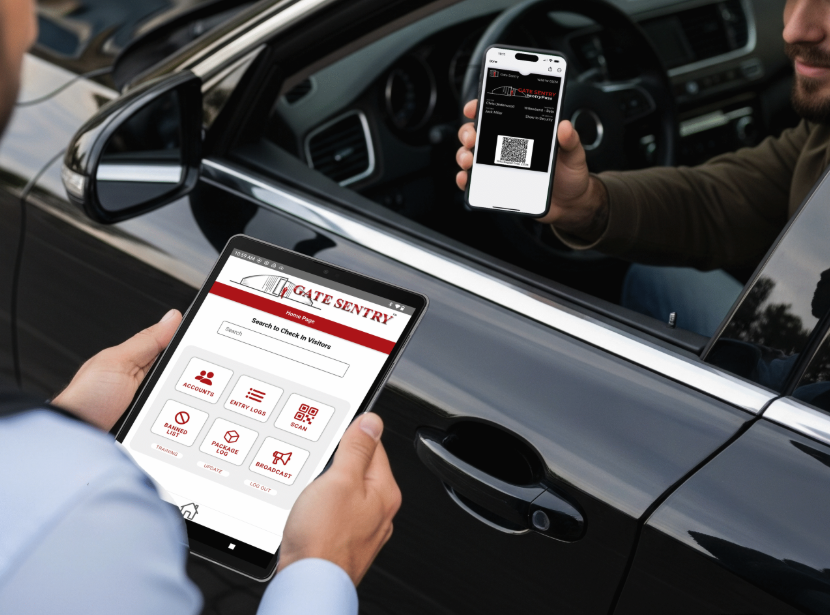
It's Saturday morning at a golf club, and cars are starting to line up at the entrance.
Some people have early tee times. Others are meeting friends for breakfast or heading to the restaurant. There are also employees arriving for work, landscaping trucks, and contractors coming through.
Security has to figure out who's a member, who's a guest, and where everyone is going.
At clubs with a lot of morning traffic, that can be difficult to manage.
In our conversations with clubs and resort communities, one issue comes up regularly: there are several different groups using the same entrance, but they don't all have the same access permissions.
Members want to get in without being questioned every time. Guests need a way to show they're expected. Commercial vehicles may need to follow different rules.
The entrance has to accommodate all of them.
Why Club Access Is Harder Than It Looks
Country clubs and resort properties often manage a wider range of visitors than a typical residential community.
Depending on the property, that might include:
- Members and their families.
- Guests visiting members.
- Golfers arriving for tee times.
- Restaurant and hotel visitors.
- Employees and service providers.
- Contractors and construction crews.
- Tournament and event attendees.
Many of these groups arrive around the same time.
Morning tee times are a good example.
If several groups are scheduled to play within a short window, their vehicles may arrive close together. Some drivers are familiar to the security officers, while others may be visiting the club for the first time.
The challenge is confirming the right information without making every driver explain their visit from the beginning.
That becomes even more difficult when guest information is kept in different places.
The golf shop may have a tee-time list, the restaurant knows about a reservation, and security has its own visitor records.
If those departments aren't communicating, the officer at the gate may have to make a phone call to confirm someone who's already expected.
The Member Frustration: Proving You Belong
One concern we've heard from clubs is that members don't always have an easy way to establish their access privileges at the entrance.
Someone may have been a member for years, but the officer working that day doesn't recognize them.
The member gets frustrated because they're being questioned at their own club.
On the other side, security doesn't necessarily know who every member is, especially when staffing changes.
The answer shouldn't be to stop checking people.
The club needs an accurate record that officers can access when someone arrives.
With Gate Sentry, security can search available household or member account information, names, addresses, and other recorded details from a tablet.
The club is responsible for keeping its authorized member and account information current.
For guests, members can register expected visitors in advance.
Those guests may receive SentryPass, a digital pass that can be saved to Apple Wallet or Google Wallet.
When they arrive, the officer scans the pass to retrieve their registration and follows the club's check-in procedures.
At compatible unmanned entrances, authorized members can use VirtualKey in the Gate Sentry app to open approved gates or doors.
That provides a mobile access option without requiring a separate physical credential at every entrance.
Matching Each Arrival to the Right Access
Different visitors need different ways to enter.
A member arriving every day shouldn't necessarily go through the same process as a contractor who's there for one afternoon.
Here's how Gate Sentry and Sentry Solo can support those situations.
| Who arrives | What they need | Access option |
|---|---|---|
| Members | Regular access to authorized entrances | Account lookup at staffed gates or VirtualKey at compatible unmanned entrances |
| Members' guests | Access for a visit, dinner, or weekend | SentryPass at staffed gates; SoloPass or VirtualKeypad at unmanned entrances |
| Event and tournament guests | Access during a scheduled event | Event-specific guest lists for staffed check-in |
| Vendors and construction crews | Access to designated entrances during approved hours | Staffed check-in or assigned VirtualKeypad credentials |
| Unexpected visitors | A way to request authorization | Security Call at staffed gates or Intercom at compatible unmanned entrances |
The club determines which access methods are available and which permissions each group receives.
A member's guest isn't automatically authorized to use every service entrance or amenity on the property.
Likewise, a contractor with access to a service gate shouldn't necessarily have permission to enter the members' clubhouse.
Keeping those permissions separate makes the system easier to manage.
Guests, Tee Times, and Peak Mornings
One of the busiest times at a golf club is often the morning, when several tee times are scheduled close together.
That's also when the club wants members and their guests to arrive on time.
If security has to call the golf shop for every unfamiliar driver, the process can slow down.
Pre-registering expected guests can help.
A member adds their guest ahead of time, and the registration becomes available to security.
When the guest arrives, the officer can find the registration or scan SentryPass, then complete the club's required checks.
That doesn't mean Gate Sentry automatically reads the golf club's tee-time booking system or confirms a player's reservation.
The club still needs a process for registering visitors and keeping the appropriate departments informed.
But having expected visitor information available at the gate can reduce unnecessary phone calls and repeated questions.
If someone arrives without being registered, Gate Sentry's Security Call feature gives officers a way to contact the relevant household or authorized account contact using the available call list.
The club's procedures determine how that authorization should be handled.
Commercial Vehicles and Vendors
Clubs also have to manage people who aren't coming to golf, dine, or visit a member.
Landscaping crews may arrive early in the morning. Construction contractors may be working on a renovation. Delivery vehicles may need access to service areas.
We've heard from clubs where commercial vehicles were a particular concern because some drivers tried to enter as ordinary guests rather than following the property's vendor procedures.
Giving vendors their own access credentials can help management keep those visits organized.
At compatible unmanned entrances, Sentry Solo allows approved vendors to use VirtualKeypad.
They scan the SentrySign QR code at the entrance and enter their assigned code through their phone's browser.
With Access Scheduler, management can set the hours when vendor access is available at particular entrances.
For example, a landscaping contractor might be permitted through a service gate during weekday mornings without having access late at night.
At staffed entrances, officers can look up available vendor registrations and record check-ins.
Those records can be useful when management needs to review contractor activity later.
Events and Tournaments
Golf tournaments, weddings, charity events, and member gatherings can bring a large number of visitors to a club at once.
Those guests may only need access for one afternoon.
Adding every event attendee to a member's regular guest list can create unnecessary cleanup afterward.
Gate Sentry's Events feature allows organizers to create a separate guest list for a scheduled event.
The event name, date, time, and guest information are available to security so officers can find the appropriate list during check-in.
The organizer can also choose whether to receive supported arrival notifications.
When the event's scheduled period ends, the guest list no longer appears as an active event list.
Historical records remain available according to the platform's recordkeeping configuration.
For clubs hosting frequent tournaments or private events, this helps keep event visitors separate from the club's everyday guest information.
Spas, Pools, Gyms, and Clubhouses
The main gate isn't always the only controlled entrance at a club.
There may also be separate doors or gates for the gym, spa, pool, tennis courts, or clubhouse.
Some clubs issue different cards or fobs for these areas.
That means another set of credentials for members to carry and another set for management to maintain.
With Sentry Solo, members with authorized accounts can use VirtualKey at compatible amenity entrances.
The club decides which entrances each account can access.
Access Scheduler can also establish different operating hours for individual amenities.
For example, the fitness center might have a longer access window than the pool, while a clubhouse is temporarily closed for a private event.
For more on this, see HOA Amenity Access: Pools, Courts and Clubhouses.
Hotel and Restaurant Visitors
Clubs with restaurants, hotels, or resort accommodations often have another layer of visitor management.
The people expecting guests may work in different departments.
The restaurant knows about dinner reservations. The front desk knows who's checking in. The golf shop knows who's scheduled to play.
But the security officer may not have access to that information.
Gate Sentry can support visitor registrations across the property, but the club still needs a process for sharing expected guest information with the entrance.
We cover that in more detail in Resort Visitor Management: Keeping Departments and the Gate in Sync.
Questions to Ask Before Choosing a System
If your club is reviewing access control software, I'd start by looking at the types of arrivals security handles throughout the week.
How does an officer confirm that someone has authorized access?
Can members register guests before they arrive?
What happens when a tournament brings in dozens of people at once?
Are contractors using the same entrances as members?
Can management set different permissions for amenities and service gates?
And what information can the club review after a busy weekend?
Those questions will help identify where the current process is working and where it could be improved.
For more about Gate Sentry's options for these properties, visit our Club and Hospitality Access Management page.
Frequently Asked Questions
How can a club confirm someone is authorized to enter?
At staffed entrances, Gate Sentry gives security officers access to available account and visitor information. The club remains responsible for maintaining accurate membership records and following its verification procedures.
How can clubs make guest check-in easier during morning tee times?
Members can register expected guests in advance. Security officers can then find the registration or scan SentryPass rather than collecting the information from scratch at the gate.
How can clubs manage tournament and event visitors?
Gate Sentry's Events feature keeps event guests on a separate scheduled list for staffed check-in, instead of adding everyone to a permanent guest list.
Can vendors be limited to certain entrances and hours?
Yes. At compatible Sentry Solo entrances, approved vendors can use VirtualKeypad credentials, while Access Scheduler controls the hours when those credentials are permitted.
Can members use the same app at the gate and amenities?
With Sentry Solo, authorized members can use VirtualKey through the Gate Sentry app at compatible unmanned gates and amenity entrances.
See How Gate Sentry Works at Your Club
If your club is reviewing its visitor management or access control system, we can walk through common situations at your entrance. We'll demonstrate member account lookup, guest registration, event check-in, and scheduled vendor access using the entrance types your club operates.
Schedule a Demo