
Multifamily Access Control & Gate Security for Apartments
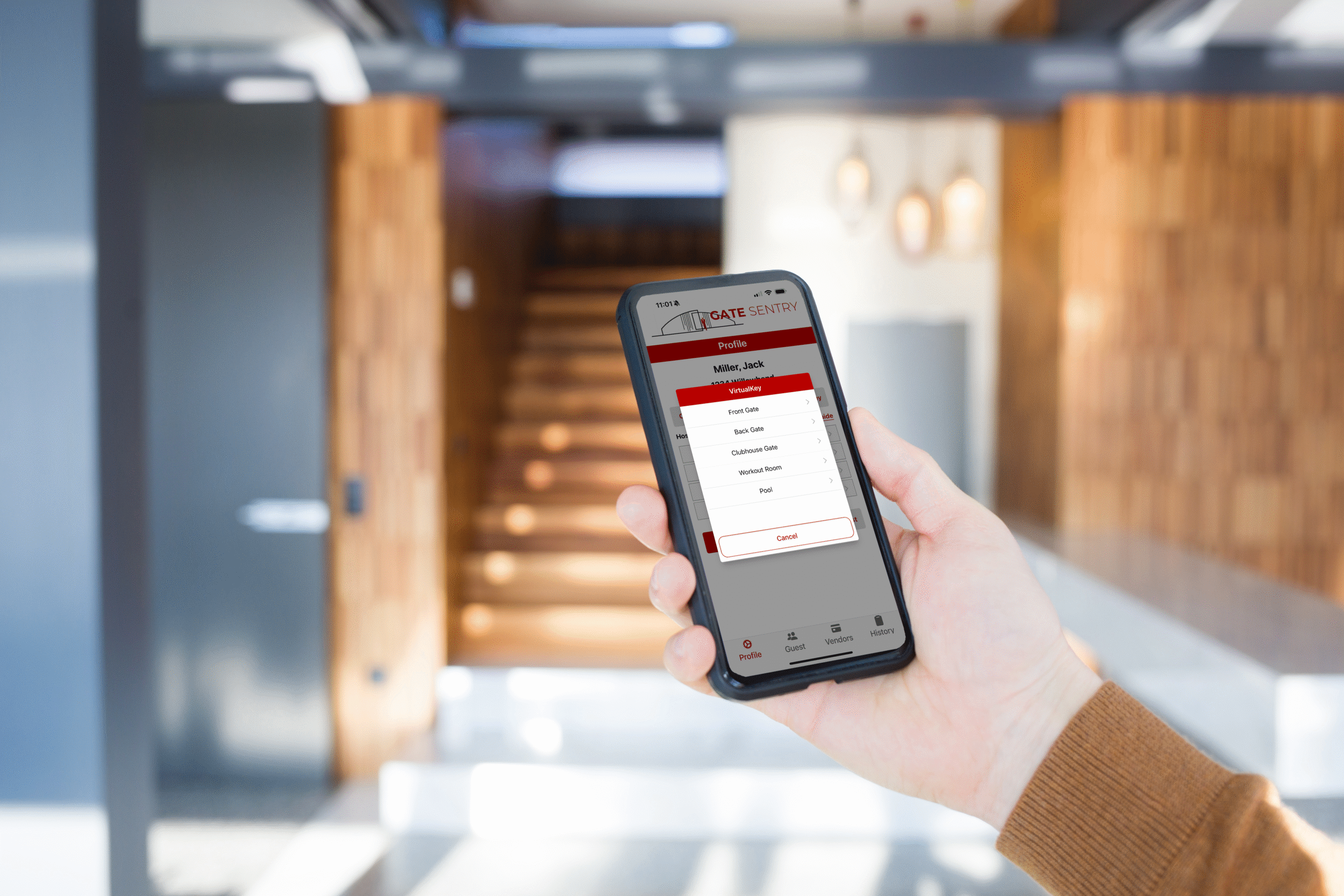
A resident loses their gate fob. Someone moves out without returning their access card. Another resident calls the leasing office because their delivery driver can't get through the entrance.
None of these situations is particularly unusual at an apartment community.
But when your property has hundreds of residents, several entrances, and people moving in and out throughout the year, keeping up with access requests can become a lot of work.
And that's before you consider the maintenance that comes with physical keypads, callboxes, card readers, and other equipment installed around the property.
For multifamily property managers, access control affects much more than who can open a gate. It determines how easily residents get into their homes, how guests and vendors are handled, and how much time staff spend managing permissions.
With Sentry Solo, multifamily communities can eliminate traditional access hardware like keypads, callboxes, and fob readers while continuing to use compatible existing gates and doors.
Here are six ways that can make a difference for multifamily access control and gate security.
1. Residents Can Use Their Phones Instead of Fobs and Remotes
Think about how many different access devices someone might need at an apartment community.
They may have a remote for the parking garage, a fob for the building, and another way to access the pool or fitness center.
And when one of those devices gets lost, damaged, or stops working, the resident usually ends up contacting the leasing office.
Now someone on the property management team has to issue a replacement, update the access system, or troubleshoot the problem.
With Sentry Solo's VirtualKey, residents can open authorized entrances directly from the Gate Sentry app.
Instead of keeping track of several physical credentials, they can select the entrance they want to use and tap to open it.
That could be the parking garage, a pedestrian gate, a building entrance, or an amenity area.
Management determines which entrances each resident is allowed to access.
For example, someone living in Building A might have access to their building, the main garage, and shared amenities, without automatically having access to every residential building on the property.
And because those permissions are managed through software, changes don't have to involve collecting or reprogramming physical fobs.
For residents, it's a more convenient way to get around the property. For staff, it's one less type of access equipment to keep track of.
2. Guests Don't Have to Depend on Callboxes or Shared Gate Codes
Guest access is another common frustration at apartment communities.
A resident is expecting friends for dinner, but when they arrive, they can't get through the gate.
Maybe the callbox isn't working. Maybe the resident missed the call. Or the visitor doesn't have the right gate code.
Now the resident is trying to help them get in, and the leasing office may end up involved if the problem continues.
With Sentry Solo, residents can send invited guests a SoloPass before they arrive.
SoloPass is a digital access link that guests open on their phones. They can tap to open an approved entrance during their authorized access period without downloading an app or creating an account.
Residents can issue passes for one-time visits, temporary periods, or ongoing access.
For example, someone who visits every weekend can have different access permissions from a friend who's only stopping by for dinner.
SoloPass is also tied to the guest's device, so simply forwarding the link doesn't give another person the same access.
And for visitors who arrive without a pass, Sentry Solo offers an Intercom feature that allows them to contact the household they're visiting through their phone.
Vendors have their own access method.
A housekeeper, landscaper, or contractor can scan the SentrySign QR code at the entrance and enter their assigned code through VirtualKeypad, which opens in their phone's browser.
That means residents don't have to share one permanent gate code with every visitor or service provider who needs access. For more on guest and vendor access at apartments and condos, see our apartment and condo visitor management page.
3. Move-Ins and Move-Outs Become Easier to Manage
For multifamily properties, tenant turnover is part of everyday operations.
A new resident needs access to the building and garage. Someone else is moving out. Another apartment is changing occupants at the end of the month.
With traditional fob systems, staff may have to issue new credentials, collect old ones, and deactivate anything that hasn't been returned.
And realistically, not every resident remembers to turn in every access card or remote when they move out.
That can leave management trying to figure out which credentials are still active and who might have them.
With Sentry Solo, authorized staff can manage resident access through the admin portal.
When a new resident moves in, management can give them access to the appropriate entrances.
When someone moves out, those permissions can be removed without waiting for a physical credential to be returned.
The same applies when a resident changes units or needs access to a different area of the property.
For a community with frequent move-ins and move-outs, being able to update permissions through one system can save quite a bit of administrative work.
It's also useful for regional managers who oversee several properties and need to make sure access permissions stay current.
4. Different Entrances Can Have Different Access Rules
Not every entrance at an apartment community should be available to everyone at all hours.
The parking garage may be open to authorized residents around the clock, while the pool has specific operating hours.
The fitness center might have different rules, and maintenance contractors may only be allowed through certain entrances during business hours.
These rules can get complicated when a property has several buildings and amenity spaces.
With Sentry Solo's Access Scheduler, administrators can establish access hours for different groups and individual entrances.
For example, a property might allow residents to access the fitness center from 5 a.m. to 11 p.m. while restricting vendor access to weekdays.
If someone attempts to use their assigned credential outside the approved schedule, that credential won't open the entrance.
Management can also configure holiday restrictions or temporary schedule changes when necessary.
Think about a pool that's closed for maintenance or a clubhouse that's reserved for a private event.
Instead of making permanent changes to the property's normal access rules, administrators can adjust the appropriate schedule.
This is particularly helpful at multifamily communities with several amenities, where keeping track of separate access hours can otherwise become a manual process.
5. Property Managers Have Access to Visitor and Entry Records
Another important part of multifamily access control is being able to review what happened at an entrance.
Say a property manager receives a complaint about a vendor entering a building outside approved working hours.
Or there's a question about when someone accessed the pool or clubhouse.
If the property relies on shared gate codes, it may be difficult to determine whose credentials were used.
With Sentry Solo, access activity is recorded digitally.
Authorized administrators can review information such as the credential used, the entrance involved, and when the access occurred.
This gives management records to reference when questions come up.
For example, if a contractor has an assigned vendor credential, management can review its recorded use rather than trying to determine who may have entered a shared code.
It's important to understand that an access record shows which credential was used. It doesn't independently confirm the identity of every person who physically entered, and it doesn't necessarily establish when someone left the property.
But having searchable activity records is still useful for reviewing access patterns, managing vendors, and investigating concerns.
And because the information is available through the admin portal, property managers don't necessarily have to visit the entrance or contact someone on-site to review the records.
6. Eliminate Unnecessary Hardware Across the Property
One of the biggest considerations for multifamily owners and operators is how much their access control system costs to maintain.
A property might have keypads at the vehicle gates, card readers at building entrances, callboxes for visitors, and fob systems for amenities.
Each of those devices serves a purpose, but it's also another piece of equipment that may eventually need repairs or replacement.
If a callbox stops working, management has to arrange a repair.
If a card reader fails, residents may have trouble accessing their building.
And if a community decides to upgrade several entrances at once, replacing all that equipment can become a significant expense.
Sentry Solo is designed to eliminate the need for many of those traditional access devices.
Instead of installing another physical keypad or callbox, residents, guests, and vendors use their phones to access authorized entrances.
For properties with compatible existing gates and doors, this can mean keeping the infrastructure they already have while eliminating unnecessary access hardware.
The physical gates, door hardware, and other necessary infrastructure still need maintenance. Software and connectivity also have ongoing costs.
But eliminating traditional access devices means fewer pieces of equipment to purchase, repair, and eventually replace.
For multifamily properties that already have working automatic gates, that's worth considering before investing in another hardware-based system.
What About Managing Multiple Properties?
The maintenance question becomes even more important for companies managing several apartment communities.
A regional manager might oversee properties with different gate systems, amenity schedules, and resident access procedures.
Having to log into separate platforms or contact someone at each property for routine access changes can take more time than necessary.
Gate Sentry allows authorized administrators to manage multiple properties through one account.
That means a regional manager can review access information, manage permissions, and oversee different communities without maintaining a completely separate administrative process for each location.
Each property can still have its own entrances, users, and access rules.
For operators expanding their portfolios, that kind of centralized management can make it easier to keep procedures consistent across properties.
Multifamily Access Control: Traditional Systems vs. Sentry Solo
Here's a general comparison of how the two approaches work.
| Feature | Traditional Access Systems | Sentry Solo |
|---|---|---|
| Resident entry | Fobs, remotes, cards, or PINs | VirtualKey in the app |
| Guest access | Callboxes or guest credentials | SoloPass mobile links |
| Vendor access | Physical keypads or assigned credentials | VirtualKeypad on the vendor's phone |
| Move-ins and move-outs | Credentials issued and deactivated | Permissions managed through the admin portal |
| Amenity access | Depends on equipment and system | Access Scheduler for groups and entrances |
| Entry records | Vary by provider | Searchable digital access records |
| Equipment | Keypads, readers, callboxes, and gate equipment | Eliminates traditional visitor-facing devices at compatible entrances |
| Multiple properties | Depends on provider | Multi-property management through one account |
Modern hardware-based systems can also offer remote administration, individual credentials, and detailed reporting.
The main difference with Sentry Solo is that properties can eliminate much of the traditional equipment residents and visitors would otherwise need to use at the entrance.
What If Your Multifamily Property Has On-Site Security?
Not every multifamily community is completely unmanned.
Some high-rise buildings have staffed lobbies, while other properties have security officers at their main entrance.
For those situations, Gate Sentry offers tablet-based visitor management.
Security officers can check in visitors, review expected arrivals, capture identification, and search visitor records.
Guests can also receive SentryPass, a digital pass that officers scan to pull up the visitor's information already on file.
Sentry Solo handles unmanned entrances, while Gate Sentry supports locations where someone is physically checking visitors in.
For properties with a combination of staffed and unmanned entrances, both can be managed through the Gate Sentry platform.
What Should Multifamily Managers Consider Before Switching?
Before choosing a new access control system, I'd look at how residents and staff actually use the property.
If the leasing office regularly handles lost fobs, that's worth paying attention to.
If residents frequently call because their guests can't get through the gate, look at how the current system handles visitor access.
And if the community has several buildings or amenities, consider how much work goes into keeping permissions and access schedules updated.
It's also worth reviewing the condition of the existing gates and doors.
If that equipment is already working, find out whether a new system can use it rather than requiring a full replacement.
Finally, ask about installation, ongoing software costs, connectivity, and how access is handled when something isn't working normally.
Those details often matter more to everyday operations than a long list of features.
Making Access Easier for Residents and Staff
For residents, access control should be pretty straightforward.
They want to get into their building, park in their garage, visit the gym, and let approved guests in without constantly running into problems.
For property managers, the priorities are a little different.
They need to keep permissions updated, manage tenant turnover, oversee vendors, and make sure people have access to the right areas.
And ideally, they want to do that without spending their days replacing fobs, troubleshooting callboxes, or managing several disconnected systems.
With Sentry Solo, multifamily communities can keep their compatible existing gates and doors while eliminating unnecessary access hardware and managing entry through mobile-based credentials.
Residents use VirtualKey, guests receive SoloPass links, and vendors use VirtualKeypad. Management can control access schedules, update permissions, and review activity through the admin portal.
For properties considering an upgrade, it's worth finding out how much traditional equipment they can eliminate before investing in another round of replacements.
See How Sentry Solo Works for Multifamily Properties
Looking to eliminate aging keypads, callboxes, and fob systems at your apartment community? We'd be happy to show you how Sentry Solo works with existing infrastructure and how residents, visitors, and property managers use the system.
Schedule a Demo