
Apartment Gate Security: Smartphone Entry for HOAs
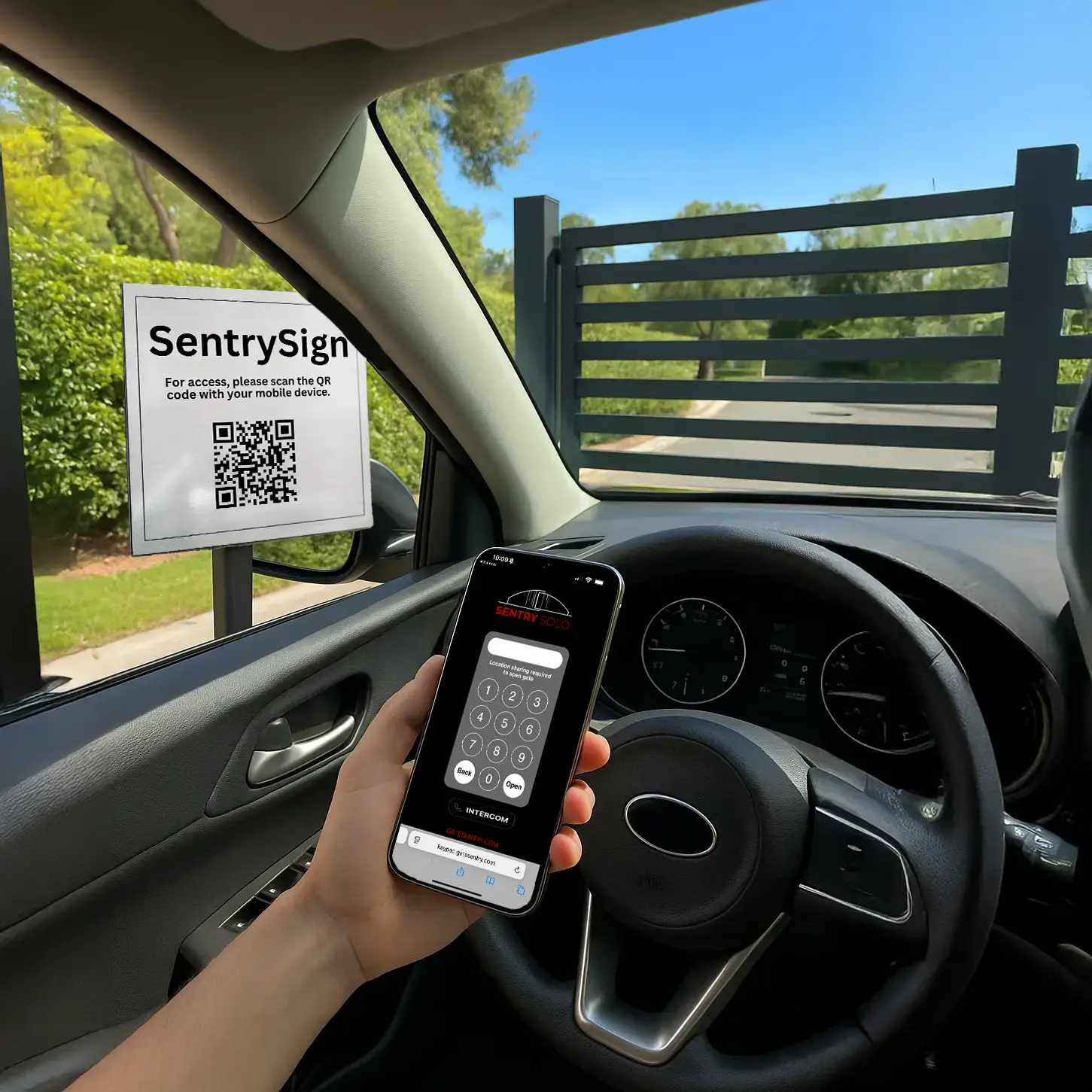
A delivery driver pulls up to an apartment gate and asks for the gate code.
The resident gives them the number they've always used, and the driver gets through.
The next day, a different driver asks for the same thing.
It's convenient, but over time, that code can end up being shared with a lot of people who don't actually live at the property.
That's one of the frustrations apartment managers and HOA boards run into with older gate entry systems.
Others are more straightforward. A callbox stops working, a resident loses their gate fob, or someone moves out without returning their credentials.
Apartment gate security is about controlling who can enter the property, but the way those permissions are managed matters just as much as the gate itself.
Today, communities can choose between traditional callboxes, keypads, fob readers, cellular entry systems, and smartphone-based access.
Here's how those options differ and what to consider if your current system is creating more work than it should.
What Is an Apartment Gate Security System?
An apartment gate security system controls access to a gated residential property.
Depending on the equipment installed, people may enter using a physical fob, access card, PIN, remote, or smartphone.
Visitors may need to contact a resident through a callbox, enter an approved credential, or check in with an on-site security officer.
Different properties have different needs.
A small apartment community with one unmanned entrance may need a relatively simple way for residents and approved visitors to enter.
A larger property may have multiple gates, pedestrian entrances, and amenities, all with different access rules.
Before comparing systems, it's helpful to understand what each access method actually does.
What's the Difference Between a Gate Code and a Callbox Code?
These terms get used interchangeably, but they aren't necessarily the same thing.
A gate code is usually a number someone enters into a keypad to request that the gate open.
Some properties assign a different code to each resident or vendor. Others use shared codes.
A callbox code is typically a directory number associated with an apartment or household.
A visitor enters that number to contact the resident. If the resident answers and authorizes the visit, they can use the callbox system to open the gate.
For example, a delivery driver may ask for a resident's callbox code because they need to reach that apartment through the entrance directory.
That's different from having a PIN that opens the gate directly.
The problem with shared gate codes is that they can continue circulating after someone no longer needs access.
A resident gives the code to a delivery driver. A cleaner gets it from another resident. Someone shares it with a friend.
Eventually, the property may have very little control over who knows the number.
And changing a shared code can inconvenience everyone who's legitimately using it.
How Do Cellular Gate Entry Systems Work?
A cellular gate entry system uses a cellular connection instead of a traditional telephone landline for certain communication functions.
Devices sold as cellular gate openers, or cell gate openers, work on the same idea: a cellular connection lets the gate be opened by a call or an app instead of a wired phone line.
That can be useful at properties where installing or maintaining a landline is expensive or inconvenient.
But a cellular callbox is still a callbox.
Visitors may still need to search for the resident, place a call, and wait for someone to answer.
The equipment also needs power, installation, and maintenance.
That's not necessarily a problem if the property likes its existing entry process.
But if the goal is to eliminate the callbox interaction entirely, switching from a landline callbox to a cellular one may not solve that particular issue. (See more callbox alternatives for apartments and gated communities.)
What Changes With Smartphone Gate Entry?
With smartphone-based entry, the property can allow authorized users to open entrances through their phones.
For residents, that may mean using an app rather than a physical gate remote or key fob.
For invited guests, it may mean receiving a digital pass before arriving.
And for approved vendors, it can mean using an individual access credential that follows the property's rules.
Gate Sentry's Sentry Solo provides different methods for those groups.
Learn more about mobile gate access for unmanned gated communities.
It works with compatible existing gates and can eliminate the need for traditional visitor-facing keypads and callboxes.
The physical gate and required control equipment still need to function, but residents and visitors can interact with the access system through their phones instead.
How to Open an Apartment Gate With Your Phone
With Sentry Solo, the process depends on who's entering.
Residents: VirtualKey
Residents use VirtualKey through the Gate Sentry app.
They select an entrance they're authorized to use and tap to open it.
Management controls which gates, doors, and amenities are available to each account.
That could include the main vehicle gate, pedestrian gate, pool, or clubhouse.

Guests: SoloPass
A resident can send an invited guest a SoloPass link by text or email.

The guest opens the link on their phone and can tap to open the approved entrance.
They don't need the Gate Sentry app, an account, or a gate code.
The resident can authorize one-time, temporary, or ongoing access according to the type of visit. Learn more about SoloPass mobile visitor access.
Vendors: VirtualKeypad
Approved vendors use VirtualKeypad.
They scan the SentrySign QR code at the entrance, which opens a keypad in their mobile browser.
Then they enter their assigned access code.
Management can set the dates, hours, and entrances the credential is allowed to use.
That can be useful for recurring cleaners, landscaping companies, contractors, and other service providers.
Unexpected visitors: Intercom
Sometimes a visitor doesn't have a pass or code.
With Sentry Solo's Intercom, they can scan the SentrySign and contact the household they're visiting by address.
The system doesn't display the resident's personal phone number.
This provides a way to request access without depending on a traditional callbox directory. Read more about how a QR code intercom works.
What Should Property Managers Look for in Gate Entry Records?
When someone needs to review an entrance-related incident, access records can be helpful.
Some keypad and fob systems record which credential was used and when.
Mobile access systems can also record credential activity associated with individual accounts.
With Sentry Solo, authorized administrators can review recorded access activity through the portal.
But a credential-use record isn't the same as verified identity.
It can show which account or credential was used to open an entrance, not necessarily who physically passed through it.
That's an important distinction when comparing claims about gate security and reporting.
I'd ask providers to demonstrate the actual records management would receive, rather than relying on a general promise about tracking everyone who enters.
What About Pools, Tennis Courts, and Clubhouses?
Gate access isn't always limited to vehicles.
Apartment communities and HOAs may also have controlled entrances to pools, fitness centers, tennis courts, and clubhouses.
Those facilities often have different access rules.
The pool might close at 10 p.m. The gym may have longer hours. Tennis courts might be unavailable during maintenance.
With Sentry Solo, residents can use VirtualKey at authorized amenities, while management configures the appropriate permissions.
Access Scheduler allows administrators to establish regular hours and temporary changes for different entrances and groups.
That can be particularly useful for holiday schedules, maintenance closures, or events.
Rather than assuming one credential should work everywhere at all times, the property can configure access according to how each facility is used.
Should You Replace Your Apartment Gate or Just the Access System?
This is one of the first questions I'd ask.
If the gate operator is in good condition and the property is mainly frustrated with the callbox, keypad, or credential-management process, replacing the entire gate may not be necessary.
A mobile access system may be able to work with the existing gate.
That depends on compatibility, so the provider should review the actual equipment before making promises about installation.
It's also worth comparing ongoing costs.
Callboxes, readers, and other entrance devices may require repairs and service visits.
Mobile systems have software fees and connectivity requirements, and the underlying gate equipment still needs maintenance.
I'd compare the full cost of each option instead of assuming one approach is always cheaper. For a broader comparison, see our community gate access systems buyer's guide.
What About Residents Who Prefer Traditional Entry?
Not every resident is comfortable using a smartphone for access.
Some may prefer a remote or fob. Others may have a device that isn't compatible or need a backup method when their phone isn't available.
That's something the property should plan for before changing the system.
I'd ask providers what alternatives are available and how the entrance will operate when connectivity or equipment is unavailable.
I'd also want to know what happens when someone moves out, a vendor's authorization expires, or a visitor arrives without being registered.
Those everyday situations matter more than a demonstration where everything works perfectly.
Frequently Asked Questions
What is apartment gate security?
It's the process and technology used to control entry at a gated apartment community, including access permissions, credentials, visitor procedures, and gate equipment.
What is a gate or callbox code?
A gate code typically opens the gate when entered into a keypad. A callbox code usually connects a visitor to a specific residence so the occupant can authorize entry.
What is a cellular gate entry system?
It's an access system that uses cellular connectivity for communication rather than relying entirely on a traditional telephone line.
Can residents open an apartment gate with their phones?
Yes, with a compatible mobile access system. Sentry Solo residents use VirtualKey in the Gate Sentry app to open authorized entrances.
Can guests enter without a gate code?
Yes, with systems that support digital guest credentials. Sentry Solo's SoloPass lets invited guests open an approved entrance using a mobile link rather than a shared gate code.
Do smartphone gate systems work with existing gates?
Some do. Sentry Solo can work with compatible existing gate infrastructure, subject to the property's equipment and connectivity requirements.
See How Smartphone Gate Entry Could Work at Your Property
If your apartment community or HOA is dealing with shared gate codes, aging callboxes, or constant credential replacements, we'd be happy to review your current setup. We can demonstrate how residents, guests, vendors, and unexpected visitors use Sentry Solo at compatible entrances.
Schedule a Demo